

You are using an out of date browser. It may not display this or other websites correctly.
You should upgrade or use an alternative browser.
You should upgrade or use an alternative browser.
Back to Full Screen
- Thread starter qzx
- Start date
Lawrence_SoCal
Active Member
My understanding is a couple of possibilities
1. Check your OBS > Settings > Base Resolution
2. Then check the input resolution you are working with. And for your video source, check your transforms. You may want/need to fully reset a transform
Assuming your aspect ratios match, you shouldn't end up with bottom or side bars, unless you are cropping. *If* aspect ratio is different, then you need to scale/crop make aspect ratio match to avoid the 'black bars'
1. Check your OBS > Settings > Base Resolution
2. Then check the input resolution you are working with. And for your video source, check your transforms. You may want/need to fully reset a transform
Assuming your aspect ratios match, you shouldn't end up with bottom or side bars, unless you are cropping. *If* aspect ratio is different, then you need to scale/crop make aspect ratio match to avoid the 'black bars'
Lawrence, I reset transform. Stretch to screen is Pix 2 of 3 at the bottom and what OBS gave me on my board. Pix 3 of 3 is from the video and not full screen at the top or bottom but full screen at the sides. But it is not full screen like the 2nd pix in reply #1. Pix 1 of 3 is my resolution settings.
Thanks
QZX
Thanks
QZX
Attachments
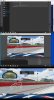
I learned through trial and error over the last week that when I had the full screen I was in 16:10 aspect ratio. Then I started working with other resolutions not knowing they were in 16:9 aspect ratios. I was trying to get the best quality picture on Youtube. Well, videos said I had to put 2560x1440 (2K/VP9 encoding) in my output scaled resolution, which was a 10:9 aspect ratio. That was why I was not getting full screen in my monitor. I thought my monitor was a 16:9 aspect ratio, but turns out to be a 16:10 ratio. So, me and maybe some others have choices to make. Am I going to make videos to fit my screen or have the best quality for Youtube. Videos told me if you want the best from Youtube to put your videos in 2K or VP9 encoding & 60 FPS, I must upload in 2560x1440 (16:9) output resolution & 60 FPS for the best Youtube videos.
Thanks Guys
QZX
Thanks Guys
QZX
Last edited:
Lawrence_SoCal
Active Member
Hopefully you know that there are ways to simply direct download YouTube videos.
Using OBS to capture a YT video is doing it the hard way, and necessarily entails re-encoding a lossy compression codec (ie a loss of resolution).
beware who you listen to in the interwebs, many of them are clueless
Using OBS to capture a YT video is doing it the hard way, and necessarily entails re-encoding a lossy compression codec (ie a loss of resolution).
beware who you listen to in the interwebs, many of them are clueless
Lawrence, I'm really only interested in recording my games and upload to my account. I just record my games and upload. Very new to this stuff. Learning the terms, language etc. I trying to learn capture, maybe edit and upload. Any learning from you and others is greatly appreciated.
Thanks
QZX
Thanks
QZX
Lawrence_SoCal
Active Member
Sorry - misunderstood/misinterpreted your earlier comment
If recording (not livestreaming) then look into recording settings. It is recommended to NOT use CBR (which is usually required for streaming) for local recording.
So 2K is a resolution. VP9 is a completely unrelated encoding format
And recognize that resolution recommendation is based on a point-in-time evaluation of how YouTube re-compresses video for distribution (long technical articles online of how, why, details, etc on this). This most likely will change of over time.
And then there is the question of whether you simply plan to upload your recording, or if you will do any local editing first, in which case you could then change various settings/codecs/aspects when rendering. But in general, for simple, set your base and output resolution to be the same, and it should match your monitor (or be a fraction of it.. gets tricky when you want to record a higher resolution than your monitor). The challenge is you only have a laptop screen with an aspect ratio different from what you want to upload
If recording (not livestreaming) then look into recording settings. It is recommended to NOT use CBR (which is usually required for streaming) for local recording.
Videos told me if you want the best from Youtube to put your videos in 2K or VP9 encoding & 60 FPS, I must upload in 2560x1440 (16:9) output resolution & 60 FPS for the best Youtube videos.
So 2K is a resolution. VP9 is a completely unrelated encoding format
And recognize that resolution recommendation is based on a point-in-time evaluation of how YouTube re-compresses video for distribution (long technical articles online of how, why, details, etc on this). This most likely will change of over time.
And then there is the question of whether you simply plan to upload your recording, or if you will do any local editing first, in which case you could then change various settings/codecs/aspects when rendering. But in general, for simple, set your base and output resolution to be the same, and it should match your monitor (or be a fraction of it.. gets tricky when you want to record a higher resolution than your monitor). The challenge is you only have a laptop screen with an aspect ratio different from what you want to upload