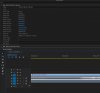
Question / Help Audio Multitrack Problem

gugliga_58

New Member
hi guys i have one serious problem
i have setting obs at the best with one video track and two audio track
one game track and one mic track,
recording goes done but when i go to open file in adobe premiere there's one audio track short than others
every times one of two track is shortest of other, i have change some times the frequency to 44.1 at 48khz and i set timestamps
but nothing to do
why? file one.jpg
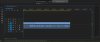
log files
 

Attachments

  • Untitled-1.jpg
    Untitled-1.jpg
    280.8 KB · Views: 58
You need to make sure in Windows' audio device settings that all your devices are the same sample rate as each other, and as what OBS is set to-- they should all be 44.1 or 48, if you have a mix there can be problems.
 
And what happens if you place first track to the third track in OBS Studio? (or just double it, record again, and import video with 3 audio tracks)
 
either you're able to compile obs or you may try to find someone to compile for you. Or you wait until this is merged into master code. Then you'll be able to test a nightly before having it in a release. There won't any release before at least a month so as I wrote, you'll have to be patient.
 
Just use second and third tracks in OBS Studio (skip first one). 2nd and 3rd should stay in sync. Ignore insignificant track's length difference (in comparison to the Video track).
 
Just use second and third tracks in OBS Studio (skip first one). 2nd and 3rd should stay in sync. Ignore insignificant track's length difference (in comparison to the Video track).

yes but the only one sync track is first the others had 0:01 or 0:02 dealayed
 
But the shift should be the same for both of them. This is better than trying to synchronize all tracks that has different delays.
 
Back
Top