Question / Help Audio Monitoring not working

dreadheaded

New Member
After having loads of issues with my computer I decided to reformat and reinstall everything, ever since I have not been able to get audio monitoring working correctly whatever I do


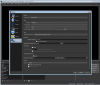
Even when set to Monitor Only{mute only} It does not output to my desktop device, no matter what device I select
 

Attachments

  • advanced audio.png
    advanced audio.png
    89.1 KB · Views: 1,673
oh sorry all the sources im trying to monitor are video files, some in VLC some in Media player

(Note) I only use media source on videos with alpha transparency
 
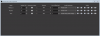
you mean this one??

and no no sign of it outputting the audio at all, I have also tried different audio devices as I have 3 audio interfaces on this PC
 

Attachments

  • advanced audio.png
    advanced audio.png
    17.5 KB · Views: 648
Ok I apologize I worked out the issue, as a last ditch attempt to fix it I went into playback settings for the USB Drivers for my Mixer and deselected "Allow applications to take exclusive control of this device" that seems to have fixed the issue
 
@unional Just wanted to say what worked for me! made an account just for this lol

I downloaded & installed VLC x64 on top of whatever I had before. Still no dice. However... I went into Advanced Audio Properties, changed the Audio Monitoring value & changed it back, and now it works properly again!

I did this for 1 browser source & 1 media playback source, each were affected by this bug. After doing it for one of each of those categories, the others (the remaining affected browser sources & remaining affected media playback sources) started working again too.

No clue why this worked or how, but it worked c:
 
Back
Top