
Audio Ducking/Auto Ducking not working

Sr. H

New Member
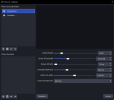
I discovered this filter a while ago; it worked at first, but the background music I play during my stream simply refuses to lower in volume. I’ve tried lowering the threshold, the sidechain source is selected correctly, and the music is a separate input from my microphone—but nothing works. Here is a screenshot of the settings I used.
 

Attachments

  • imagem_2026-10-03_102430515.png
    imagem_2026-10-03_102430515.png
    36.8 KB · Views: 28
Your compressor settings look fine (6:1 at -40 dB will duck a lot), so the problem is almost always where the audio is actually flowing. Two things to check:
1. Is "Mic/Aux" really your mic? "Mic/Aux" in the sidechain list is the global mic from Settings → Audio. If you added your mic as its own Audio Input Capture source in a scene (and the global Mic/Aux is set to Disabled or to another device), the compressor is listening to silence. Open the Fonte de Sidechain list and pick the source with the same name as the mic in your Audio Mixer, the one whose meter moves when you talk.
2. Does the music really play through "3 Musicas"? Watch the mixer while music plays. If the "3 Musicas" meter doesn't move but Desktop Audio does, the filter is on the wrong source:
  • If it's a Browser Source: tick "Control audio via OBS" in its properties, otherwise the sound bypasses the source and goes straight to Desktop Audio.
  • If the music comes from Spotify or another app: capture it with Application Audio Capture (Windows 10 2004+ / 11) and put the compressor on that, or put it on Desktop Audio.
Quick test: temporarily set Ratio to 32:1 and Threshold to -60 dB and talk. If the music still doesn't drop, it's one of the routing issues above, not the settings. Once it works, go back to around 6:1 / -35 dB and a 300–500 ms release so it fades back in smoothly.
 
Back
Top