
Add automatic Game Capture to Scene Switcher

RemagUK

New Member
Hi chaps,

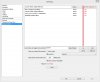
I thought this would be quite a good addition for scene switcher. I've attached a roughly made paint thing to give you an idea of what it could look like.

It is basically so you don't have to press a button to game capture when going over to a game application and thus avoiding the black screen and making it all a bit more fluid.

Good idea yea?

Regards,

Remag
 

Attachments

  • Idea.jpg
    Idea.jpg
    79.8 KB · Views: 247
I'm not sure how much more development effort will be put into OBS1 at this point but I guess it's possible. Your use of the scene switcher isn't what I expected (usually people configure it for a game with multiple windows to capture like League of Legends). Wouldn't separate scene collections for your games work better, or are you playing multiple games each streaming session?
 
I like it this way because It will switch to a different scene which doesn't show my monitor clearly when I'm doing anything outside of the game, so it's good if I alt tab or do something that I don't necessarily want viewers to see easily.

In my opinion you could really make a lot more use of the scene switcher, I think it would be great to include the game capture options into it somehow. It seems a bit pointless having to press a button to start game capture when scene switcher can already detect that you have opened a game.

*Edit* For example, every time I alt tab at the moment, when you tab back into the game you have to press a binding to begin game capture again.
 
Last edited:
I like it this way because It will switch to a different scene which doesn't show my monitor clearly when I'm doing anything outside of the game, so it's good if I alt tab or do something that I don't necessarily want viewers to see easily.
For what it's worth that's easily avoided by not using a monitor capture source.

In my opinion you could really make a lot more use of the scene switcher, I think it would be great to include the game capture options into it somehow. It seems a bit pointless having to press a button to start game capture when scene switcher can already detect that you have opened a game.
A better solution is to have the game capture source itself auto-hook the game, which is functionality already present in OBS Multiplatform. :) It's much more likely that the scene switcher plugin will be made for OBS-MP than have functionality added to the OBS1 version allowing it to manipulate source properties directly, such as setting a target process for the game capture source.

Again though anything's possible, it's an open source project after all.
 
The way I've gotten around this is to setup a hotkey in my game capture to tell it "hey, grab the game window I'm in right now".
 
The way I've gotten around this is to setup a hotkey in my game capture to tell it "hey, grab the game window I'm in right now".

Yea, that's what I do too, but it means there's a few seconds of black screen (and sometimes you forget to turn it on if you alt tab).

The game capture auto-hook sounds good, shame it isn't in the current stable version of OBS, you'd think that would have been an important thing to add!
 
Back
Top