You are using an out of date browser. It may not display this or other websites correctly.
You should upgrade or use an alternative browser.
You should upgrade or use an alternative browser.
OBSを起動してもシーントランジョンだけが表示される
- Thread starter sdhysdhy
- Start date
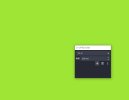
ととにかく回答ありがとうございます、しかし1.も2.も出来ませんとにかく何も動かないのです。
- トレイメニュー (時計の近く) に OBS アイコン (隠れている場合もあります) があるので、それをクリックします。
- 「シーントランジション」ドック・ペインはフローティングになっているようですが、ドッキングするには、ドッキング・ペイン自体のヘッダーをダブルクリックします。

Suslik V
Active Member
Look carefully in the tray - there is OBS icon.
OBS window may be mistakenly opened in other desktop view of Windows. Here is example:
Edit: In the Windows OS you can click in the far bottom-right corner (small, barely noticeable vertical strip after the clock) - and you already openedanother desktop view.
OBS window may be mistakenly opened in other desktop view of Windows. Here is example:
Obs Gui not showing when I open it up
Hi, problem is in the title, and I've done a decent amount to try to fix and nothing works, and I can't really find any useful answers online, this problem is really uncommon and no one gives a straight/meaningful answer. I've restarted my pc, closed and reopened with task manager, uninstalled...
obsproject.com
Edit: In the Windows OS you can click in the far bottom-right corner (small, barely noticeable vertical strip after the clock) - and you already opened
Last edited:
Suslik V
Active Member
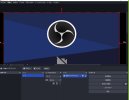
I see output of the OBS Virtual Camera on your screenshot. Because OBS is not care about what you trying to open - it can open even own output feed... I don't think that you need these advanced functions of OBS right now. OBS Virtual Camera is special virtual device that was added to your system programmatically. It intended to be opened from 3rd party applications (Discord, Zoom etc), so OBS final picture (like chroma-keyed camera with replaced background) can be used as casual web camera. This virtual camera feeds only by running OBS. When OBS Studio is not running - Virtual Camera shows simple image as a reminder that it is in the OFF state. So forget about the OBS Virtual Camera for now.
To get a picture from a simple web camera device you need:
To get a picture from a simple web camera device you need:
- Connect your video device to your PC.
- In the Settings of the Windows OS you need to allow this device to be opened by OBS application. Look for parameter that says about "to grand permission to use this device" or something like that. Search online for details. There are many versions, example: https://support.microsoft.com/en-us...b61a-1930-6ed0-47f0ed2ee15c#id0ebd=windows_11
- In the properties of the "Video Capture Device" source in OBS select proper device. OBS supports only DirectShow devices, so some devices may be not listed.
- Make sure that right resolution, fps and format of the video is set in the properties.
- Make sure that device is not used by other applications (like Discord, Zoom etc). Internally, in the Windows OS, most devices generates only one digital stream that delivered to the application that asked for it. Thus, one device can't do two or more digital outputs simultaneously - it just not able to.
Please post a log with your issue! Here's how...
OBS Studio creates a log file each time you run it which contains very useful diagnostic information. Without a log file, it's much harder for any support volunteers to figure out problems and your post may be ignored. To upload a log file, go to the Help menu > Log Files > Upload Last Log...
obsproject.com
Suslik V
Active Member
I mentioned the options as they are named when the Language in OBS settings set to "English".
In OBS terminology the "Video Capture Device" source - is any DirectShow compatible device capable of producing a digital data stream (video data and sometimes audio data).
If there is no DirectShow compatible devices plugged to your PC then the "Device" list for the "Video Capture Device" source in OBS will be empty. Obviously, the "OBS Virtual Camera" virtual device installed with the OBS itself is DirectShow compatible, so it is listed.
There are online tutorials, guides etc in this section of the forum:
Brief help:
 obsproject.com
If something doesn't work, please, give some details.
In OBS terminology the "Video Capture Device" source - is any DirectShow compatible device capable of producing a digital data stream (video data and sometimes audio data).
- If you want to connect a video camera to your PC with USB cable and capture it with OBS then you need DirectShow compatible device.
- If you want to connect a video camera to your PC with HDMI cable (or any other cable) then you need capture card, Capture card should support DirectShow at its output.
- If you don't need "OBS Virtual Camera" virtual device on your PC then you can uninstall it completely. To uninstall "OBS Virtual Camera" device find and run this command file as administrator:
data\obs-plugins\win-dshow\virtualcam-uninstall.bat
If there is no DirectShow compatible devices plugged to your PC then the "Device" list for the "Video Capture Device" source in OBS will be empty. Obviously, the "OBS Virtual Camera" virtual device installed with the OBS itself is DirectShow compatible, so it is listed.
There are online tutorials, guides etc in this section of the forum:
Brief help:
Help Portal | OBS
OBS (Open Broadcaster Software) is free and open source software for video recording and live streaming. Stream to Twitch, YouTube and many other providers or record your own videos with high quality H264 / AAC encoding.
obsproject.com
If something doesn't work, please, give some details.
Suslik V
Active Member
To clarify:
"virtualcam-uninstall.bat" file is for deletion form the system, so it is named "UNinstall" ( アンインストールするには ).「OBS Virtual Camera」デバイスをインストールするには、以下のコマンドファイルを管理者として実行してください。data\obs-plugins\win-dshow\virtualcam-uninstall.bat」
Suslik V
Active Member
Then you shouldn't use "Video Capture Device" source at all - remove it from the list of the Sources (there is a Trash/Bin icon in the bottom of OBS user interface).
To record the screen of your PC use "Display Capture" source. I already said this in the other thread of yours.
To record the screen of your PC use "Display Capture" source. I already said this in the other thread of yours.
Suslik V
Active Member
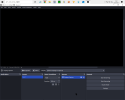
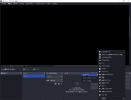
This message: "Select a display to capture", means that no display device was specified in the Properties of the "Display Capture" source. So, OBS doesn't know what device you want to capture. Try to click and select the one in the Properties of the "Display Capture" source (either in this Toolbar or by right-click over the source in the "Sources" pane and click on the "Properties" entry).