Installation:
Download the file and then paste it into the folder C:\Program Files\obs-studio\data\obs-plugins\frontend-tools\scripts
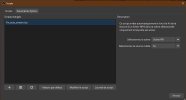
Open OBS, go to Tools/Scripts, add the downloaded script, then on the right choose your ending scene and then your media source (MP3), click on close.
When you finish a stream and switch to your ending scene, OBS will automatically stop the stream(s) once your media has finished playing.
Download the file and then paste it into the folder C:\Program Files\obs-studio\data\obs-plugins\frontend-tools\scripts
Open OBS, go to Tools/Scripts, add the downloaded script, then on the right choose your ending scene and then your media source (MP3), click on close.
When you finish a stream and switch to your ending scene, OBS will automatically stop the stream(s) once your media has finished playing.