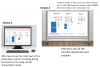
I'm a school teacher and use OBS to mirror part of my screen to a projector connected to a SMART board.
SMART have some software called SMART Ink which allows me to write over the top of app windows using my finger/pen on the digital whiteboard. This works in 'most applications', such as Office apps, web browsers and even Notepad. However, it doesn't work over in the main OBS window or (most importantly) my OBS 'projector' window. As a result, when I'm using OBS in my lessons - as I do every lesson - I can't use the interactive whiteboard at all.
I've sent a support email to SMART asking them if there's a setting/option/flag that an app (such as OBS) has to set in order to, I guess, make it appear as an 'editable document' or something. My guess is it's probably as easy to fix as that. The fact this inking works in Notepad (which is just plain text) suggests all an app has to do is declare itself as an editable document or something for it to work.
Anyone got any ideas how/if this might be possible?
Jake
SMART have some software called SMART Ink which allows me to write over the top of app windows using my finger/pen on the digital whiteboard. This works in 'most applications', such as Office apps, web browsers and even Notepad. However, it doesn't work over in the main OBS window or (most importantly) my OBS 'projector' window. As a result, when I'm using OBS in my lessons - as I do every lesson - I can't use the interactive whiteboard at all.
I've sent a support email to SMART asking them if there's a setting/option/flag that an app (such as OBS) has to set in order to, I guess, make it appear as an 'editable document' or something. My guess is it's probably as easy to fix as that. The fact this inking works in Notepad (which is just plain text) suggests all an app has to do is declare itself as an editable document or something for it to work.
Anyone got any ideas how/if this might be possible?
Jake