Stream Dropping Lots Of Frames At Random Intervals

DarkDevil26

New Member
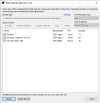
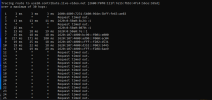
Hello, I have had issues streaming to Twitch for years, I have a feeling something is wrong on my ISP's end. I ran a trace route and I have no idea how to read it. I also will provide my last log file when there was issues.

For years I would have issues with dropped frames, I've tried everything from replacing the router and modem several times, several techs out to the house, switching cables, and switching every OBS setting known to man. So I was wondering if anyone could potentially identify the problem so I know what exactly to tell my ISP when I call them.

Thank you!
 

Attachments

  • Capture.PNG
    Capture.PNG
    32.5 KB · Views: 43
  • Capture2.PNG
    Capture2.PNG
    6.6 KB · Views: 28

qhobbes

Active Member
Before you start streaming, Settings > Advanced > Network > enable Dynamically change bitrate... [Apply] [OK]
Your log shows that you're connecting to the US East 10 server so stick with that. You can also try setting up a free Restream account, connecting that to your twitch account and then configure OBS to use Restream.io as the Service.
 

Darkest_Devil26

New Member
Before you start streaming, Settings > Advanced > Network > enable Dynamically change bitrate... [Apply] [OK]
Your log shows that you're connecting to the US East 10 server so stick with that. You can also try setting up a free Restream account, connecting that to your twitch account and then configure OBS to use Restream.io as the Service.
I’ve tried restream and it’s the same results, dynamic bitrate seems like a good idea in principle will destroy my quality and not eliminate the issue at hand which is my ISP. I just don’t know what to tell them, or how’d I go about getting the problem fixed.
 

qhobbes

Active Member
I would still advise enabling dynamic bitrate. Right now you are streaming at 6060 Kbps. If you have < 6060 of bandwidth between you and the twitch server, you're going to drop frames. If something happens and you suddenly only have 5700 of bandwidth between you and the twitch server, OBS can adjust the video bitrate. It will go back up when that bandwidth is available. It's that or no frames at all until required bandwidth is available.

The log will show you how much and how long it's changing.
 
Top