Good morning,
I noticed some strange behavior with the T-Bar when I move it manually.
The situation is this:
Both scenes have audio.
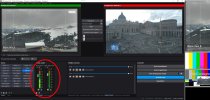
1) Scene 1 in Program Out (Step 1-3)
2) Scene 2 in Preview (Step 1-3)
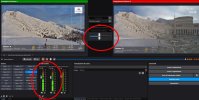
3) I manually move the T-Bar to overlap Scene 1 and Scene 2, and I hear both audio signals. (Step 2-3)
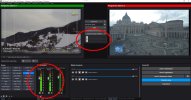
4) I return the T-Bar to its starting position so that only Scene 1 is in Program Out. (Step 3-3)
The audio for Scene 2 isn't muted; in fact, in Program Out, I hear both audio signals.
This behavior doesn't occur if I automatically perform the transition by pressing the "Transition" button.
This is a portion of log file:
16:51:33.444: Attempted to add Scene without specifying a canvas! Using default canvas instead.
16:51:33.445: User started manual transition to scene 'Esterna 1'
16:51:36.413: Manual transition cancelled
I'm attaching the three screenshots.
OBS version is 32.0.4.
Thanks
Giuseppe
I noticed some strange behavior with the T-Bar when I move it manually.
The situation is this:
Both scenes have audio.
1) Scene 1 in Program Out (Step 1-3)
2) Scene 2 in Preview (Step 1-3)
3) I manually move the T-Bar to overlap Scene 1 and Scene 2, and I hear both audio signals. (Step 2-3)
4) I return the T-Bar to its starting position so that only Scene 1 is in Program Out. (Step 3-3)
The audio for Scene 2 isn't muted; in fact, in Program Out, I hear both audio signals.
This behavior doesn't occur if I automatically perform the transition by pressing the "Transition" button.
This is a portion of log file:
16:51:33.444: Attempted to add Scene without specifying a canvas! Using default canvas instead.
16:51:33.445: User started manual transition to scene 'Esterna 1'
16:51:36.413: Manual transition cancelled
I'm attaching the three screenshots.
OBS version is 32.0.4.
Thanks
Giuseppe