Hi everyone,
I’ve recently started experiencing severe random stuttering in all my game recordings using OBS. In-game performance is perfectly smooth with no visible lag or frame drops — the issue only appears in the recorded video. Before this issue, there were minor, short lags, but now for some unknown reason the stutters are much longer and stronger, making the footage (at least for me) unwatchable.
Here’s what I’ve already tried (none of these helped):
I can also provide a short sample video if needed.
If anyone has ideas on what could cause random heavy stutters despite stable FPS in-game, I’d really appreciate some help or troubleshooting advice.
Thanks in advance!
I’ve recently started experiencing severe random stuttering in all my game recordings using OBS. In-game performance is perfectly smooth with no visible lag or frame drops — the issue only appears in the recorded video. Before this issue, there were minor, short lags, but now for some unknown reason the stutters are much longer and stronger, making the footage (at least for me) unwatchable.
Here’s what I’ve already tried (none of these helped):
- Ran OBS as administrator
- Disabled Hardware-accelerated GPU scheduling (HAGS)
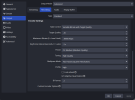
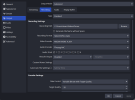
- Tested many different encoder settings and lower bitrates
- Tried recording with and without VSync in the game
- Limited FPS to match monitor refresh rate (60 FPS)
- Tested recording with NVIDIA ShadowPlay — the same issue occurs there
- GPU: NVIDIA GeForce GTX 1650 with Max-Q Design
- iGPU: Intel(R) Iris(R) Xe Graphics
- CPU: Intel Core i5-11300H @ 3.10GHz
- RAM: 16 GB
I can also provide a short sample video if needed.
If anyone has ideas on what could cause random heavy stutters despite stable FPS in-game, I’d really appreciate some help or troubleshooting advice.
Thanks in advance!