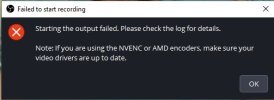
Recording is not working. When I click "start recording", an error message appears. (Attached photo).
I changed the video encoder (x264 and quicksink h.264) in the output settings and changed the recording format mpeg 4 (.mp4), qicktime (.move), hybrid mp4 (.mp4), hybrid move (.move). The recording doesn't work. My computer has 2 video drivers: Intel (R) hd graphics 4000 (08/06/2020) and nvidia geforce gt 730m (04/09/2019). What can I change in the settings to make the recording work?
I changed the video encoder (x264 and quicksink h.264) in the output settings and changed the recording format mpeg 4 (.mp4), qicktime (.move), hybrid mp4 (.mp4), hybrid move (.move). The recording doesn't work. My computer has 2 video drivers: Intel (R) hd graphics 4000 (08/06/2020) and nvidia geforce gt 730m (04/09/2019). What can I change in the settings to make the recording work?