I'm at my wits end. I can't seem to consistently get a smooth recording with OBS. I don't stream or have a webcam, I just need OBS to do one thing: record my games for my personal use. I've set it to 120fps and it occasionally does that, but after one or two recordings it goes to 10fps or worse, without me changing any of the settings. I don't think it is my system. I'm running Windows 10 on an i7 9700K @ 3.60 GHz, 16 GB 3200MHz memory and an RTX 2070S GPU. My monitor is the LG 32GK850G 32" 165Hz. I don't have any other programs running while I record the games except task manager and GPU-Z, both of which show that neither my CPU or GPU is running at capacity. In case it matters I also get dropped frames using Xbox gamebar recording, but it's not as bad as 10fps (this is why I ventured to try OBS in the first place).
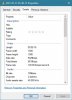
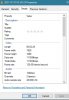
The attached files show details of a successful 120fps recording with 111k kbps and then a choppy 10fps recording with 5.5k kbps which still says 120fps.
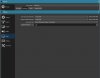
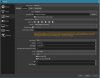
I've also attached a screenshot of my settings in OBS. I've tinkered around with base resolution to my monitor's native 1440p, recording format to mkv, bit rate and max bit rate lower and higher, but no joy. Setting the output resolution to 1440p made it even worse, I was getting around 0.1 fps or 1 frame every 10 seconds.
Any help would be much appreciated!
The attached files show details of a successful 120fps recording with 111k kbps and then a choppy 10fps recording with 5.5k kbps which still says 120fps.
I've also attached a screenshot of my settings in OBS. I've tinkered around with base resolution to my monitor's native 1440p, recording format to mkv, bit rate and max bit rate lower and higher, but no joy. Setting the output resolution to 1440p made it even worse, I was getting around 0.1 fps or 1 frame every 10 seconds.
Any help would be much appreciated!