
Random disconnect and loss of stability after stable connection for hours

ShineSprite

New Member
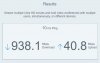
So basically I have been plagued by this issue, I'll have very stable connection with virtually no dropped frames usually for 2-3+ hours followed by 0 kbs and erratic unreliable connection. Basically ruins my stream. I have gigabit internet that's plugged into the modem so it shouldn't be an issue. The log file I've included is the most recent one I have where the issue occurs, this one after only an hour or so loses connection at around 00:52 in the log. I should note that when it drops I don't lose internet connection, I can browse just fine. OBS is the only thing that can't connect. I've also tried switching on a VPN after disconnection and it doesn't help either.
 

Attachments

  • 2021-07-03 23-12-55.txt
    2021-07-03 23-12-55.txt
    250.3 KB · Views: 23
  • speed test.JPG
    speed test.JPG
    30.6 KB · Views: 22
But there is something serious with your connection, anyway, because...

"00:51:35.630: Settings changed (outputs)
00:51:59.174: obs-browser: Uncaught (in promise) Something went wrong. (source: https://streamlabs.com/widgets/viewer-count?token=5AE93185ED4841F4AA9D:0)
00:52:01.547: socket_thread_windows: Received FD_CLOSE, 12050 ms since last send (buffer: 805335 / 808960)
00:52:01.547: socket_thread_windows: Aborting due to FD_CLOSE, error 10053
00:52:01.547: [rtmp stream: 'adv_stream'] Disconnected from rtmp://sjc05.contribute.live-video.net/app
00:52:03.556: obs-browser: WebSocket connection to 'wss://pubsub-edge.twitch.tv/' failed: Error in connection establishment: net::ERR_NETWORK_CHANGED "

(some lines left out by intention)

The first line concludes that something was changed in obs settings with intend by that time.
Then (on a couple of lines) the obs browser is moaning about online connectivity.
Then the FD_CLOSE for the main streaming session comes.
Then(!!) the websocket connection also logs about failing connections, together with the error msg, "ERR_NETWORK_CHANGED"

Shure, that not even your vpn connection makes trouble? The "network changed" message is a clear sign that something with network configuration within your windows system happened. So its definetly not only the stream connection, that drops...
 
Yeah that's the error when the issues start. I don't know what any of that means or how to remedy it.
Same error happens even when I'm using a VPN, the connection will just tank after hours of stable connection.

I don't even use the Viewer Count widget anymore I suppose I could export the scenes I'm currently using and remove everything else. I do have a lot of scenes that are old an unused.
 
I'm not trying to mislead anything, I said that because I wanted show that I still have an internet connection when my stream tanks. I tried a VPN to try and troubleshoot a possibility that my ISP could be restricting traffic. But, I'm not sure that's the case.
 
Okay, that sounds clever.
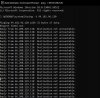
Now you should go for the message, that somewhat changed your network configuration. Perhaps you can do a "ipconfig /all" in a command shell before stream start, and repeat that exaclty when the stream connection drops. Another thing to look at may be a constantly ping ("ping -t xx.xx.xx.xx") to the ingestion server. If he responds at all, you can proof if he is reachable the moment the connection drops.
There could be problems or restrictions on the twitch site, too. I remember similar threads here in the forum...
 
Okay, well here is what I got just now. I guess I'll report back if I encounter the problem.
 

Attachments

  • ping test.JPG
    ping test.JPG
    128.1 KB · Views: 39
My situation is the same as yours, it is not stable when playing 24/24 it gets 0kb frequently
So basically I have been plagued by this issue, I'll have very stable connection with virtually no dropped frames usually for 2-3+ hours followed by 0 kbs and erratic unreliable connection. Basically ruins my stream. I have gigabit internet that's plugged into the modem so it shouldn't be an issue. The log file I've included is the most recent one I have where the issue occurs, this one after only an hour or so loses connection at around 00:52 in the log. I should note that when it drops I don't lose internet connection, I can browse just fine. OBS is the only thing that can't connect. I've also tried switching on a VPN after disconnection and it doesn't help either.
 
So I'm not positive about why this error happens, but I suspect multiple profiles have something to do with it and I believe windows socket error 10053 has something to do with it. I've created a batch file to help with the socket error, make a shortcut of it and run it as administrator so it runs in elevated cmd. I've also changed my encoding to x264 instead of Nvenc whether that matters or not. Currently running a bandwidth test for 5+ hours with 0 dropped frames.
 

Attachments

Okay, well here is what I got just now. I guess I'll report back if I encounter the problem.

That's really interesting (your screenshot!) This was way before the issue arised, isn't it?
Even then its unusual. Normally the ping'd machine would answer or (if not by intent) at least say that the packets weren't answered. This time (in your screenshot) its said that the destinations network couldn't be reached at all!

Do you have a proxy connection configured at your windows system?

(And, possibly regarding the vpn stuff: I had a vpn client for myself, a couple of years ago, that messed up my windows internal networking mechanism a bit, not to mention - serious. In those days i had to completely uninstall that vpn software.)

You can "tracert xx.xx.xx.xx", to see the single station hops touched by your packets on their way.
 
Back
Top