

I play Minecraft and I would like to record in 360 fps, but I have had a lot of encoding issues where it will be above 90% encoding loss. I am asking for someone to give me the best possible obs settings for encoding performance with a few exceptions which are:
1: I do not want to go above 22 CQP unless there is a really good reason why
2: I also want to put the least stress possible on my CPU so that I can get enough framerate in Minecraft to record at 360 fps
Here are my settings so far (My specs are an I7 3770, 16 Gb of ram, and an AMD Radeon RX 570:
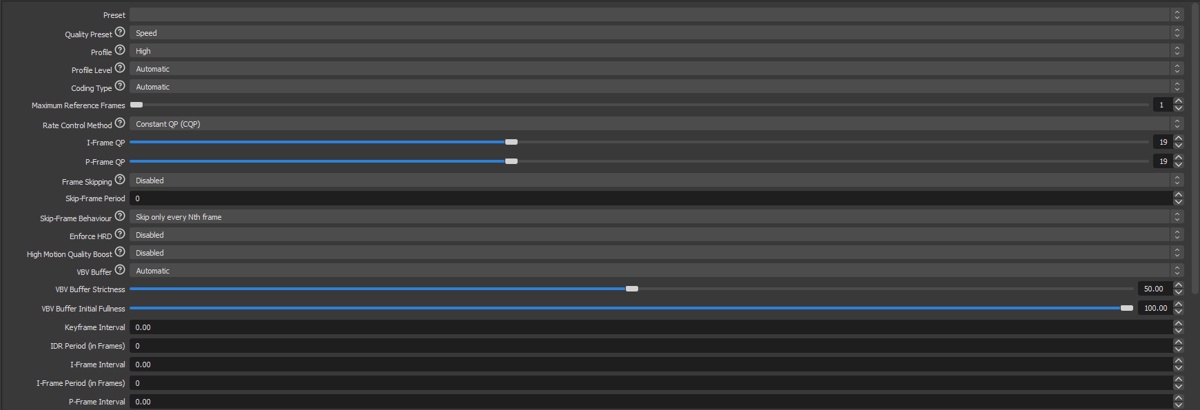
 gyazo.com
 gyazo.com
 gyazo.com
A lot of these settings I have no idea what to put a value/option in for, if you can give me the best options for what I would like that would be great, and an explanation as to why would also be great but I'm not going to beg you to waste your time explaining why.
gyazo.com
A lot of these settings I have no idea what to put a value/option in for, if you can give me the best options for what I would like that would be great, and an explanation as to why would also be great but I'm not going to beg you to waste your time explaining why.
Thanks if you can help!
1: I do not want to go above 22 CQP unless there is a really good reason why
2: I also want to put the least stress possible on my CPU so that I can get enough framerate in Minecraft to record at 360 fps
Here are my settings so far (My specs are an I7 3770, 16 Gb of ram, and an AMD Radeon RX 570:
Gyazo
gyazo.com
Gyazo
gyazo.com
Gyazo
gyazo.com
Thanks if you can help!
