Question / Help OBS Studio footage not working in editing software

A_Cross

New Member
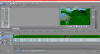
I'm having some trouble with footage recorded using OBS Studio and could use some help. Normally I record Let's Play footage and edit said footage in Sony Movie Studio Platinum 13. The footage looked just fine until I updated OBS Studio to it's current version. Now all the footage recorded using OBS looks green and pixelated when I open it in Sony Movie Studio. I've attached a picture of what I'm talking about. And I know it's OBS because I made a video in which the gameplay was recorded using the recording software included with the Elgato HD Pro 60 and a face cam was recorded using OBS Studio, and only the OBS footage was green and pixelated.

Someone please help me with this.
 

Attachments

  • MSP.png
    MSP.png
    408.8 KB · Views: 22
Nope. That just made it worse. Now I lost a video file I wanted to keep.

That's unfortunate :(. Remuxing never results to losing your original file unless you chose to overwrite the file. Try to set the target file to a different location to avoid that from happening.
 
Last edited:
That's unfortunate :(. Remuxing never results to losing your original file unless you chose to overwrite the file. Try to set the target file to a different location to avoid that from happening.
Wish you would have warned me about that when you first mentioned it. This was the first I ever heard of remuxing.
 
Back
Top