
OBS lags on any pc, with any encoder and any capture method

Svatosalav

New Member
I noticed this problem last summer, I tried different systems, computers, different disks, drivers, settings, encoders, obs versions, but this problem remains, and the lower fps is set in obs, the more it freezes. But only now, when I was testing through testufo, I noticed that weak friezes were also appearing all the time, which I hadn't noticed when testing on games. In addition, the friezes constantly appear in the preview, but in the final file they are not always in the places where the friezes were in the preview. Are there any people who have encountered this problem? How did you manage to fix it? I am ready to conduct any tests in order to find out what the problem is.
pc specs:
First pc: ryzen 7 5700x3d, 4070 ti, msi b550 gaming plus, ssd nvme netac nv7000 2tb, monitor samsung odyssey g5 32 165hz, but for the test, it was locked at 120hz.
Second pc: intel 2600k, 1060 6gb, sata ssd 480gb, capture card ezcap live gamer raw.
logs:
https://obsproject.com/logs/3o6cYTIhH0JPrnYP first pc hags-on
https://obsproject.com/logs/maaypEp3WSfAuiUs first pc hags-off
https://obsproject.com/logs/f2Mv0K95P2ey2mcw second pc hags-off.
tests: https://www.youtube.com/playlist?list=PLqIG5-nPah28DUXHhoo9Un-pB8p9fiPrS
there is a more visual test where every 30 seconds the fps of the video seems to drop twice for 10 seconds without missing frames, but there was a test on the film and I do not know if it can be uploaded here.
 
First PC, there's no rendering or encoding lag but why are you encoding CQVBR @ 200Mb/s?

Just wasting space & resources. Try CQP Rate Control & see if things improve. Your SSD is DRAMless & performance will suffer as the drive gets full or if there's heavy sustained workloads.

21:59:23.249: [obs-nvenc: 'advanced_video_recording'] settings:
21:59:23.249: codec: H264
21:59:23.249: rate_control: CQVBR > CQP
21:59:23.249: max_bitrate: 200000
21:59:23.249: cq: 20
21:59:23.249: keyint: 120
21:59:23.249: preset: p7 > p3
21:59:23.249: tuning: hq
21:59:23.249: multipass: qres
21:59:23.249: profile: high
21:59:23.249: width: 2560
21:59:23.249: height: 1440
21:59:23.249: b-frames: 0
21:59:23.249: b-ref-mode: 0
21:59:23.249: lookahead: true (28 frames) > False
21:59:23.249: aq: true > False
 
Last edited:
2nd PC log lacks an encoding session/incomplete. But, you should disable Low Latency Audio Buffering Mode.

Settings > Audio > Advanced

1771256465758.png


21:55:23.775: audio settings reset:
21:55:23.775: samples per sec: 48000
21:55:23.775: speakers: 2
21:55:23.775: max buffering: 21 milliseconds
21:55:23.775: buffering type: fixed
 
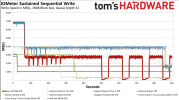
Netac NV7000 4TB, bigger drives generally perform better. Under heavy sustained writes the drive does OK for about 75 seconds & then it drops significantly, after 500 seconds it tanks. Do you notice things start going off the tracks after 8 minutes or so?

1771259108945.png
 
PC1 has plenty of RAM so I don't think your system is thrashing but am fairly certain the drive is indeed thrashing & that may be causing Virtual Memory issues/stuttering.
 
PC1 has plenty of RAM so I don't think your system is thrashing but am fairly certain the drive is indeed thrashing & that may be causing Virtual Memory issues/stuttering.
On both PCs, the lags start from the very beginning, I have a test where already at the 20th second of recording, the fps drops twice for 10-20 seconds and this repeats all the time, but I'm not sure if it's possible to send videos with movie fragments. I tried with different free space on the ssd immediately after installing the system and had the same problems, I also tried on different HDD and sata ssd's. The session was not completed on the second PC due to a power outage. I can't record in 1080p - 720p because then YouTube gives a bad codec and the quality drops. Is it possible to send tests with movie fragments here?
 
First PC, there's no rendering or encoding lag but why are you encoding CQVBR @ 200Mb/s?

Just wasting space & resources. Try CQP Rate Control & see if things improve. Your SSD is DRAMless & performance will suffer as the drive gets full or if there's heavy sustained workloads.

21:59:23.249: [obs-nvenc: 'advanced_video_recording'] settings:
21:59:23.249: codec: H264
21:59:23.249: rate_control: CQVBR > CQP
21:59:23.249: max_bitrate: 200000
21:59:23.249: cq: 20
21:59:23.249: keyint: 120
21:59:23.249: preset: p7 > p3
21:59:23.249: tuning: hq
21:59:23.249: multipass: qres
21:59:23.249: profile: high
21:59:23.249: width: 2560
21:59:23.249: height: 1440
21:59:23.249: b-frames: 0
21:59:23.249: b-ref-mode: 0
21:59:23.249: lookahead: true (28 frames) > False
21:59:23.249: aq: true > False
I use 200mb/s because it was suggested to me by the moderator of another forum where I tried to figure it out for a month. Even in the most dynamic scenes in games, the bitrate rarely reaches 60mb/s. In recent tests with friezes on a film at 23.976 fps, the bitrate was 25mb/s. I tried to record in regular CQP a long time ago, nothing changes on both PCs. Also, friezes appear on each PC in the preview with an interval of 10 to 15 seconds.
 
No need to look at flawed encodings. Honestly, don't think OBS is the issue either.

You stated the trouble started last summer. Your Nvidia driver(s) are both stale, try updating them. Nvidia had a bad patch of drivers after the 5000 series release & I'm not so sure these are past it.

Driver Version: 32.0.15.8129
Driver Version: 32.0.15.8180
 
Back
Top