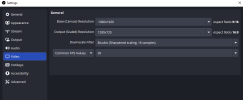
I’m using OBS Studio. In Settings > Video, my Base (Canvas) Resolution is set to 1080×1920 and the Output (Scaled) Resolution is also 1080×1920.
When I record a video, the output is correct — vertical 1080×1920.
However, when I start a Facebook Live stream, the output resolution automatically changes to 1920×1080. I’m unable to edit it back to 1080×1920 — only horizontal resolutions are available. The base resolution remains 1080×1920.
As a result, my Facebook Live stream appears stretched and distorted.
When I record a video, the output is correct — vertical 1080×1920.
However, when I start a Facebook Live stream, the output resolution automatically changes to 1920×1080. I’m unable to edit it back to 1080×1920 — only horizontal resolutions are available. The base resolution remains 1080×1920.
As a result, my Facebook Live stream appears stretched and distorted.