GhostMutGaming
New Member
So, for a long time, I've been recording videos with two iterations of OBS open at the same time, with different output folders. This has worked without flaw, until today. The only thing I've done was trying out settings for live streaming a few days ago and now, whenever I open the second window, the Docks are not showing up in the second window (Scenes etc.), and I can't click on certain things (closing the window, opening settings etc.). I can reset the Docks, but even so, certain elements are not functioning (like scenes including camera, even if I make sure the camera is not active in any other scene).
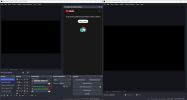
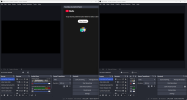
The Docks are also functioning differently in the two windows, with the size of one window (the first) not being able to be "slimmer" than a certain point, but the second window clearly has a "slimmer" size. Capture39 shows what it looks like when I start the second window, Capture40 what it looks like when I've reset the Docks. (On a side note, before this, I could have both windows be the same width, which is half the screen but now, the first window cannot come down to that size, so they overlap).
Like I said, this worked a few days ago, I have not done any changes apart from testing the live streaming thing, and now I can't get it "back" to where it was before. The thing that was "changed" when I did the tests is that the Chat Dock was opened automatically, I didn't have it up before. I've closed it, but to no avail.
Any thoughts about that I could do about this?
The Docks are also functioning differently in the two windows, with the size of one window (the first) not being able to be "slimmer" than a certain point, but the second window clearly has a "slimmer" size. Capture39 shows what it looks like when I start the second window, Capture40 what it looks like when I've reset the Docks. (On a side note, before this, I could have both windows be the same width, which is half the screen but now, the first window cannot come down to that size, so they overlap).
Like I said, this worked a few days ago, I have not done any changes apart from testing the live streaming thing, and now I can't get it "back" to where it was before. The thing that was "changed" when I did the tests is that the Chat Dock was opened automatically, I didn't have it up before. I've closed it, but to no avail.
Any thoughts about that I could do about this?