Question / Help OBS Crashes at 2hrs and 4 mins

Chase Selby

New Member
OBS Version 20.0.1 (before this recent release of 21.0.1) Currently testing to see if new version crashes or not.
Windows 10 Pro (64-bit)
Intel i7-6700k 4.00GHz
Ram 16gb Corsair Dominator
Maximus Hero VIII Mobo

So my stream ALWAYS crashes at 2:04 after starting my stream. the kb/s: goes red in the bottom right and this is says my obs has stopped working. I usually have to exit out of my obs and restart it and it will work again. Just for another 2 hours and 4 mins. This is my first post and I don't know what other info you guys need. So let me know ill post the log below. Thanks in advance
 

Attachments

init_hook_info: user is forcing shared memory (compatibility mode)

First thing is to turn off the SLI capture mode in game capture properties, you shouldn't have ever enabled that.

Second:
00:12:25.846: WriteN, RTMP send error 10054 (4097 bytes)
00:12:25.846: WriteN, RTMP send error 10054 (79 bytes)
00:12:25.846: WriteN, RTMP send error 10038 (42 bytes)
00:12:25.846: [rtmp stream: 'simple_stream'] Disconnected from rtmp://live-dfw.twitch.tv/app

This is your internet connection failing, no OBS itself. It's possible that your ISP is triggering on the type of traffic and cutting you off, or some other kind of network failure is happening.

Check: https://obsproject.com/wiki/Dropped-Frames-and-General-Connection-Issues
 
init_hook_info: user is forcing shared memory (compatibility mode)

First thing is to turn off the SLI capture mode in game capture properties, you shouldn't have ever enabled that.

Second:
00:12:25.846: WriteN, RTMP send error 10054 (4097 bytes)
00:12:25.846: WriteN, RTMP send error 10054 (79 bytes)
00:12:25.846: WriteN, RTMP send error 10038 (42 bytes)
00:12:25.846: [rtmp stream: 'simple_stream'] Disconnected from rtmp://live-dfw.twitch.tv/app

This is your internet connection failing, no OBS itself. It's possible that your ISP is triggering on the type of traffic and cutting you off, or some other kind of network failure is happening.

Check: https://obsproject.com/wiki/Dropped-Frames-and-General-Connection-Issues
I don't see where to change the SLI capture properties. Is this in OBS? And ill check that post
 
init_hook_info: user is forcing shared memory (compatibility mode)

First thing is to turn off the SLI capture mode in game capture properties, you shouldn't have ever enabled that.

Second:
00:12:25.846: WriteN, RTMP send error 10054 (4097 bytes)
00:12:25.846: WriteN, RTMP send error 10054 (79 bytes)
00:12:25.846: WriteN, RTMP send error 10038 (42 bytes)
00:12:25.846: [rtmp stream: 'simple_stream'] Disconnected from rtmp://live-dfw.twitch.tv/app

This is your internet connection failing, no OBS itself. It's possible that your ISP is triggering on the type of traffic and cutting you off, or some other kind of network failure is happening.

Check: https://obsproject.com/wiki/Dropped-Frames-and-General-Connection-Issues
Called my internet provider and the assured me, there were 0 disconnections on their end after reviewing my router logs. Im stuck. I looked at the page you sent me and tried almost every option. Still getting same problem, 2hr 4 mins
 
Very possibly the rep at your ISP is not looking in the right place. They are looking for a complete disconnection-- like what you would experience if you lost power, or unplugged the router physically, or if they had a technical failure that caused your connection to completely stop working.

What Fenrir is suggesting is something that is possibly automated in your ISP's system upstream of your router, and probably upstream of whatever edge router you're connected to, that is looking for heavy usage in certain directions and is cutting off connectivity in order to discourage certain kinds of behavior (like torrenting or video streaming). A look at the logs of your router and whatever hardware your router is connected to on their end would not show this, as sometimes this sort of traffic shaping is done in the core or in another part of an ISP's NOC and not on the edge.
 
This ones shows me disconnecting at 2hr and 4 mins in, and reconnecting 2 minutes later. My obs doesn't crash, but it (disconnects) I was able to keep playing the game i was currently playing at the time as well with no interruptions.
 

Attachments

Your log is incomplete... But I am getting the same error, but with "New Network Code" checked it displays the error differently:
15:08:31.581: socket_thread_windows: Received FD_CLOSE, 9 ms since last send (buffer: 0 / 340480)
15:08:31.581: socket_thread_windows: Aborting due to FD_CLOSE, error 10053
15:08:31.595: [rtmp stream: 'adv_stream'] Disconnected from rtmp://live-ymq.twitch.tv/app
15:08:31.595: Output 'adv_stream': stopping
15:08:31.595: Output 'adv_stream': Total frames output: 36977
15:08:31.595: Output 'adv_stream': Total drawn frames: 36968 (37031 attempted)
15:08:31.595: Output 'adv_stream': Number of lagged frames due to rendering lag/stalls: 63 (0.2%)
 
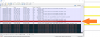
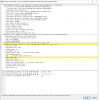
I've recently used Wireshark to analyze my internet connection while disconnecting and its showing a "RST" or Reset packet from Twitch... Any idea why they'd be closing the connection suddenly?
See the screenshots attached...
 

Attachments

  • Wireshark#1.png
    Wireshark#1.png
    82.2 KB · Views: 112
  • Wireshark#2.png
    Wireshark#2.png
    53 KB · Views: 112
Back
Top