Hi,
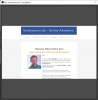
when I use the browser Plugin an choose "interact" a Windows cones up, but I cannot scroll up or down. Clicking on a link works. I habe the problem with all webpages.
Any ideas what I can do? There are no controll buttons.
OBS Version 25.0.4 / Windows 10
Thank you so much for your help
Uli
when I use the browser Plugin an choose "interact" a Windows cones up, but I cannot scroll up or down. Clicking on a link works. I habe the problem with all webpages.
Any ideas what I can do? There are no controll buttons.
OBS Version 25.0.4 / Windows 10
Thank you so much for your help
Uli