Tizye
New Member
Hey all.
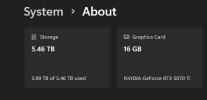
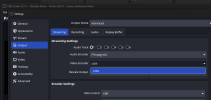
Noticed a couple weeks ago that in my Output settings, my Video Encoder (GPU: NVIDIA GeForce RTX 5070 Ti) is only showing x264 Software encoding through my CPU (AMD Ryzen 9 5900X 12-Core.) instead of showing through my GPU (GPU: NVIDIA GeForce RTX 5070 Ti.)
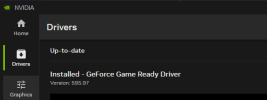
I was still on Windows 10, so figured that was my cue to finally upgrade. On Windows 11 now, still not showing up. My OBS build was outdated, so figured maybe I should update that as well. Now I'm on OBS 32.1.1, and it's still not showing up. I figured, hey, I've updated my GPU drivers recently, but let's give em another update just in case. Now my GeForce Game Ready Driver is up-to-date with Version 595.97, and it's still not showing up.
I checked the logs, and starting at Line 81 it seems to call the GPU, and then says
21:59:58.742: D3D11 GPU priority setup failed (not admin?)
That's weird, so I restart it, this time Run as Administrator. Now it says
22:10:14.530: D3D11 GPU priority setup success
which sounds great, except it's still not showing up. I also find on Line 118 - 120 saying
22:10:14.877: [NVENC] Test process failed: session_limit
22:10:14.877: NVENC not supported
22:10:14.877: Failed to initialize module 'obs-nvenc.dll'
Which sounds like it's just a missing file, that maybe didn't install correctly with OBS or my NVIDIA GeForce drivers?
I was getting this same issue on my main OBS build, my separate Portable builds, and now on a clean install completely. I know it's not an incompatibility with my GPU, I've used this GPU for streaming dozens of times with no issue, and this only appeared in the past month or so. I'm at a loss.
Noticed a couple weeks ago that in my Output settings, my Video Encoder (GPU: NVIDIA GeForce RTX 5070 Ti) is only showing x264 Software encoding through my CPU (AMD Ryzen 9 5900X 12-Core.) instead of showing through my GPU (GPU: NVIDIA GeForce RTX 5070 Ti.)
I was still on Windows 10, so figured that was my cue to finally upgrade. On Windows 11 now, still not showing up. My OBS build was outdated, so figured maybe I should update that as well. Now I'm on OBS 32.1.1, and it's still not showing up. I figured, hey, I've updated my GPU drivers recently, but let's give em another update just in case. Now my GeForce Game Ready Driver is up-to-date with Version 595.97, and it's still not showing up.
I checked the logs, and starting at Line 81 it seems to call the GPU, and then says
21:59:58.742: D3D11 GPU priority setup failed (not admin?)
That's weird, so I restart it, this time Run as Administrator. Now it says
22:10:14.530: D3D11 GPU priority setup success
which sounds great, except it's still not showing up. I also find on Line 118 - 120 saying
22:10:14.877: [NVENC] Test process failed: session_limit
22:10:14.877: NVENC not supported
22:10:14.877: Failed to initialize module 'obs-nvenc.dll'
Which sounds like it's just a missing file, that maybe didn't install correctly with OBS or my NVIDIA GeForce drivers?
I was getting this same issue on my main OBS build, my separate Portable builds, and now on a clean install completely. I know it's not an incompatibility with my GPU, I've used this GPU for streaming dozens of times with no issue, and this only appeared in the past month or so. I'm at a loss.