Question / Help No windows with webcam out of OBS

Erikerik

New Member
Hello,
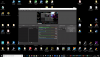
I have only a windows from my webcam in OBS with the red border.
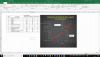
But, when I record on my desk, I hav'nt a windows with my webcam. So I don't know where is my face on the screen.
I have try with two other webcams and I obtain the same problem.
Do you have a solution to my problem ?
Thanks.
Erik
 
I'm not sure if I don't understand you entirely, but if you need a life preview of your OBS recording/stream, you can connect a second monitor to your machine and send the windowed or fullscreen projector feature of OBS to the second monitor.
 
Thanks for your answer.
In fact, when I add in the box "Sources" of OBS "Périphérique de capture vidéo" in french, I obtain Picture 1. Without a new windows with my webcam.
Then when I record my screen with Excel, I don't see my face in a windows of my webcam. However, my face is record wiht Excel : Picture 2.

Do I explain my problem "clearly" ?
Thanks
Erik
 

Attachments

  • Picture 1.png
    Picture 1.png
    639.2 KB · Views: 24
  • Picture 2.png
    Picture 2.png
    569.3 KB · Views: 23
If the source with your webcam is listed above the source that captures Excel, you should see the window with your webcam above Excel. If you added Excel as window, make sure the source that captures Excel is listed below the source that captures your webcam.

Imagine the list of sources a stack of painted papers on a canvas. The bottom source lies directly on the canvas. The source above it (in the OBS list of sources) is the paper that is on top of the bottom paper. If it is smaller than the canvas, like your webcam, it overlays the bottom paper. You created this arrangement in your first picture where your webcam window is visible. I don't understand what you did in the second picture, though. For me, it's simply a screenshot of Excel.
 
In the second picture, I want to see a windows from my webcam and my face in a corner of Excel. It is'nt the case and that is my problem during the OBS record.
 
Back
Top