

I am very noob with OBS, I have OBS 29.1 installed on a Windows 10 laptop and a desktop and I stream to YouTube occasionally. I have two questions that are puzzling me:
1. On my desktop the user interface in the "Controls" panel shows two "buttons" - "Start Streaming" and "Manage Broadcast", on my laptop in the same panel I only have "Start Streaming", given that I have fumbled around with both installations, how did I remove the "Manage Broadcast" button from the laptop.
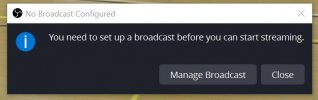
2. On the laptop, I only have to hit the "Start Streaming" button to start streaming. On the desktop when I hit the "Start Streaming" button I get the error message "You need to set up a broadcast before you can start streaming", which I do and can stream. But every time I try to stream I get the same error message. What do I need to do on the desktop to set up the default broadcast and save it. I have looked for an answer to this and have been unable to find one.
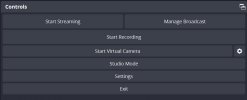
1. On my desktop the user interface in the "Controls" panel shows two "buttons" - "Start Streaming" and "Manage Broadcast", on my laptop in the same panel I only have "Start Streaming", given that I have fumbled around with both installations, how did I remove the "Manage Broadcast" button from the laptop.
2. On the laptop, I only have to hit the "Start Streaming" button to start streaming. On the desktop when I hit the "Start Streaming" button I get the error message "You need to set up a broadcast before you can start streaming", which I do and can stream. But every time I try to stream I get the same error message. What do I need to do on the desktop to set up the default broadcast and save it. I have looked for an answer to this and have been unable to find one.