Missing part of video when record or preview

Andy-P

New Member
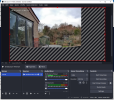
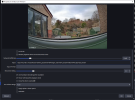
Managed to hook up an IP BirdBox Camera, and get full image preview in configuration settings, but in both preview and recording it is missing the bottom and right hand side of the video stream.
I'm new to this and am rather overwhelmed by the configuration options... what am I missing - is there something simple I have missed?
 

Attachments

  • OBS-configuration-preview.png
    OBS-configuration-preview.png
    656 KB · Views: 25
  • OBS-standard-preview.png
    OBS-standard-preview.png
    520.3 KB · Views: 19
Might have stumbled over the answer by finding handle in bottom right corner to shrink to fit the visible window/canvas! YIPPEE!!
OBS-canvas-adjusted.png
 
Might have stumbled over the answer by finding handle in bottom right corner to shrink to fit the visible window/canvas! YIPPEE!!
Yep sounds like you have: the black and grey lines indicate that the source you have added (image, video feed etc) is outside your canvas display, meaning it is not part of the captured footage.

Manually shrinking it down using the adjust dots around the edge of you source so it fits is one of the easiest ways to fix this... it should also snap to the edge if you have not turned off that feature in settings (EDIT: under Settings > General > Source Alignment Snapping)

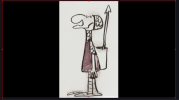
Another method is right-clicking the source and selecting Transform > Fit To Screen (or pressing Ctrl/Cmd+F with keyboard shortcuts) for it to automatically fit to the entire canvas without overlap... this method will create letterboxing (ie black bars) around the source if its dimensions do not correctly match your canvas display (as see in my attached screenshot.

Good luck with the rest of your new OBS journey!
 

Attachments

  • Screenshot 2026-01-18 003921.png
    Screenshot 2026-01-18 003921.png
    261 KB · Views: 16
Back
Top