TechQuestions
New Member
Dear Experts,
For the past few weeks, I have been using OBS to:
- page through pictures/images and make voice overs
- same for a PDF files
Now, I have an MP4 video, and I want to:
- play the video
- pause the video at different points, for different
amounts of time, and make comments, highlight things the cursor, etc.
- export the video to a new MP4 file
I've been trying to use the VLC media source,
similar to how I snagged the windows for images, or PDF.
(before anyone asks, yes, Windows 10, OBS and VLC media player are all 64 bit)
But I've got a lot of surprises.
1:
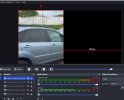
The vertical video is flushed the left.
Both while recording, and on MP4 output.
First it had the audio from the MP4, and my voice
See the image
2:
Just as I was writing this, suddenly, in OBS, there is no more sound in the MP4 video.
That is, as I was recording.
But at least one time I got the MP4 audio on output.
Even though both audio jacks are set as maximum.
As you can see in the image.
Questions:
1:
How to get the VLC video centered?
2:
What is the secret to getting the audio/sound back as I am recording.
Thanks a lot
For the past few weeks, I have been using OBS to:
- page through pictures/images and make voice overs
- same for a PDF files
Now, I have an MP4 video, and I want to:
- play the video
- pause the video at different points, for different
amounts of time, and make comments, highlight things the cursor, etc.
- export the video to a new MP4 file
I've been trying to use the VLC media source,
similar to how I snagged the windows for images, or PDF.
(before anyone asks, yes, Windows 10, OBS and VLC media player are all 64 bit)
But I've got a lot of surprises.
1:
The vertical video is flushed the left.
Both while recording, and on MP4 output.
First it had the audio from the MP4, and my voice
See the image
2:
Just as I was writing this, suddenly, in OBS, there is no more sound in the MP4 video.
That is, as I was recording.
But at least one time I got the MP4 audio on output.
Even though both audio jacks are set as maximum.
As you can see in the image.
Questions:
1:
How to get the VLC video centered?
2:
What is the secret to getting the audio/sound back as I am recording.
Thanks a lot