I live stream sports using a laptop and I'm wondering if there are some changes I could make to my recording settings to improve visual quality for my archival copy.
I use two different encoders for live stream and the local recording.
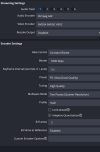
Live stream: Nvidia NVENC HEVC 5500 Kbps - Constant Bit - keyframe 2s - preset p5 slow good quality - tuning high quality - multipass two passes quarter resolution
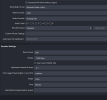
Recording: X264 - CBR - 7500 Kbps - keyframe 2, medium cpu usage, profile main
I'm finding that the NVENC HEVC stream visual quality is exceptionally better than what I'm getting with the x264 recording. (The live stream is less blurry, sharper, and motion seems to just look better with less blockiness)
When I stream I only show about 16% cpu usage in OBS so I have some headroom but I'm not sure what to focus on.
Attached screenshot of OBS settings for recording/streaming.
I use two different encoders for live stream and the local recording.
Live stream: Nvidia NVENC HEVC 5500 Kbps - Constant Bit - keyframe 2s - preset p5 slow good quality - tuning high quality - multipass two passes quarter resolution
Recording: X264 - CBR - 7500 Kbps - keyframe 2, medium cpu usage, profile main
I'm finding that the NVENC HEVC stream visual quality is exceptionally better than what I'm getting with the x264 recording. (The live stream is less blurry, sharper, and motion seems to just look better with less blockiness)
When I stream I only show about 16% cpu usage in OBS so I have some headroom but I'm not sure what to focus on.
Attached screenshot of OBS settings for recording/streaming.