Question / Help Help with local recording

All of your lost frames are due to encoding lag.

- Run OBS as administrator
- Use Nvenc encoding
- Do NOT use "Max Quality" -- this uses CUDA for 2-pass encoding and puts a large strain on your GPU
- Turn off Psychovisual Tuning (also uses CUDA)

If you still encounter encoding lag, try changing your recording output from your E: drive to your C: drive. Any bottleneck from storage output will be included in the encoding lag report.
 
so, i was looking into record some gameplay while playing beat saber, but my videos are always stuttering and i really don't know what to try.
i have a i7 8700k and a 1080ti and 16 gb of ram. Thanks for the help!

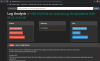
Here you go
Please use the log analyzer to fix your issue.
You have serious problems, your encoder is overloaded.

Switch from "x264" to NVENC.
If possible record using MKV then remux to MP4 [no loss of quality]
 

Attachments

  • log analysis.PNG
    log analysis.PNG
    65 KB · Views: 27
Back
Top