
Generic Encoder error

92merc

New Member
I have OBS running on an older Dell Optiplex micro 5050. Since it's a micro, no slots for a video card. I'm stuck with Intel integrated Graphics 630, and i5 7500T processor.

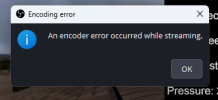
I keep getting a generic "encoder error". Dell hasn't updated graphics drivers since 2015. But I did find some on Intel's site from 11/2025 I've installed. Running on Windows 11 24H2 LTSC. Have OBS setup to "Run as Administrator". Also have OBS setup in the graphics area of Windows to run "High Performance". I have settings down to 30 fps and 5 Meg bandwidth. Don't really need quality for my stream.

My stream is fairly generic in my opinion. One static graphic. One GIF graphic. One JPG. I have a browser refresh setup on the GIF and JPG. One data import field. And for audio, I'm using VLC to point to an ICECAST server stream.

During broadcast, CPU under 20%. GPU runs about 40%. I have 32 Gigs RAM. Only running OBS on this computer.

Doing searches, most results are video driver related. But I'm curious if my ICECAST stream could also be a cause since audio is getting encoded as well.

If I'm Live and it hasn't crashed, you can see my stream here: https://www.youtube.com/@BismarckWeather/

Until I made the graphics tweaks, I'd get a couple of hours. My best is about 23 hours.

Looking for any help. Much appreciated.

DaleZ.
Bismarck, ND
 

Attachments

Only lasted a couple of hours last night. Crashed again.
 

Attachments

  • 2026-03-11 21-59-58.txt
    2026-03-11 21-59-58.txt
    12.8 KB · Views: 12
  • Capture.PNG
    Capture.PNG
    28.5 KB · Views: 9
Your graphics driver is crashing. Looks like the OEM driver may not be the solution. Your audio is lagging too as well.

1st log
20:59:19.024: Device Remove/Reset! Rebuilding all assets...
20:59:19.058: Failed to rebuild shared texture: 0x80070057

20:59:19.095: [qsv encoder: 'simple_video_stream'] encode failed
20:59:19.095: Error encoding with encoder 'simple_video_stream'
20:59:19.095: Video stopped, number of skipped frames due to encoding lag: 2570/1308606 (0.2%)
20:59:19.095: [rtmp stream: 'simple_stream'] Encoder error, disconnecting
20:59:19.095: [rtmp stream: 'simple_stream'] Socket send buffer is 2097152 bytes
20:59:19.096: Output 'simple_stream': stopping
20:59:19.096: Output 'simple_stream': Total frames output: 1308597
20:59:19.096: Output 'simple_stream': Total drawn frames: 1306058 (1308621 attempted)
20:59:19.096: Output 'simple_stream': Number of lagged frames due to rendering lag/stalls: 2563 (0.2%)

2nd log
23:48:18.335: gs_texture_open_nt_shared (D3D11): Failed to open shared 2D texture (887A0005)
23:48:18.335: Device Removed Reason: 887A0006
23:48:18.335: Device Remove/Reset! Rebuilding all assets...
23:48:18.374: Failed to rebuild shared texture: 0x80070057

23:48:18.407: [qsv encoder: 'simple_video_stream'] encode failed
23:48:18.407: Error encoding with encoder 'simple_video_stream'
23:48:18.407: [rtmp stream: 'simple_stream'] Encoder error, disconnecting
23:48:18.407: [rtmp stream: 'simple_stream'] Socket send buffer is 1048576 bytes
23:48:18.407: Output 'simple_stream': stopping
23:48:18.407: Output 'simple_stream': Total frames output: 194479
23:48:18.407: Video stopped, number of skipped frames due to encoding lag: 366/194506 (0.2%)
23:48:18.407: Output 'simple_stream': Total drawn frames: 194156 (194524 attempted)
23:48:18.408: Output 'simple_stream': Number of lagged frames due to rendering lag/stalls: 368 (0.2%)
 
OBS removed support for older Intel hardware some time ago. I know for sure Gen 2-6 were removed & it may have included gen 7??

The last versions of OBS that work with the older hardware are OBS 27 & I think 28 may be OK too.

If you still can't get traction after switching back to the Dell driver, v28 is on page 7 at the bottom & v27 can be found on page 9.

 
Thanks for that. I've reverted back to 28.1. Had to re-add my TXT sources. But that was about it.
 
I think I'll call it quits. I don't have a spare PC to let run that meets requirements. Thanks anyway.
 
Audio is still lagging (bad). The driver is still crashing. The rig is old. Hardware could be failing or it could be something as simple as it's over-heating.
17:51:54.029: Device Remove/Reset! Rebuilding all assets...
17:51:54.070: Failed to rebuild shared texture: 0x80070057
17:51:54.097: [qsv encoder: 'simple_video_stream'] encode failed
17:51:54.097: Error encoding with encoder 'simple_video_stream'

FYI, this version requires v29. Might want to try with an older version.
[xObsBrowserAutoRefresh] Version 1.1 loaded.
 
Nope on over heating. Fan wasn't even kicking in. 20% CPU, 40%GPU, or less.

That was 28.1.

Thanks again.
 
What's weird about the audio stream, that's coming off an ICECAST server on my own network. Only 32kbps, mono.
 
No, you misunderstood. These Dell micro PC's have small fans. When they actually spin up a bit, you can't miss the noise. Almost as bad as 1U rack server fans. So I would have heard it if it was actually being taxed. And I had watched the CPU/GPU resources.

No matter. I'm now testing the latest OBS on a PC I really didn't intend to use. But it's an i5 14th gen. Should be current enough. If it works stably, I'll probably throw in a NVIDIA 5050 card as that PC could use the GPU for another piece of software I have on it. New GPU is only running 8-11%. CPU is less than 7%. And that's with about 6 other apps I'm running on the same PC for my weather website.
 
Fans should have been running, it was under load.

It will run fine with the 14500/UHD770. Hopefully there's at least 32GB of RAM in the system, more the merrier. If you're only going to be doing 1080p the 5050 will be OK. It's not an ideal GPU to match to that CPU, especially if you want to do any higher resolutions. 5060TI or 5070 would be nice match with the 14500. If it's a k variant 5070TI or Super.
 
I have my stream limited to 64 kb audio. It's just the NOAA weather radio, so I don't need HI-FI. And I've limited it to 5 Meg stream. It's just pictures and a bit of data. Hasn't taxed the new PC at all. Video output also set to 1280x720. And I do have 32 Gigs RAM. It's only using 10 Gigs. And that's with 2 weather software programs, ICECAST, IPTimeLapse software and NGINX. Plus OBS now. And 2 different sync tools backing everything up to my NAS.

I just added in audio noise suppression. That cleaned up the audio real well. I was surprised at how well the filter cleaned the radio hiss out. But my stream did stop at about 12 hours. I didn't see anything in the logs. Later today or tomorrow, I'm going to plug an old weather radio to the mic port. See if that'll helps instead of ICECAST audio. It's in the basement, so reception isn't as good as what I'm currently using. But it may work better with because of the noise suppression.

Not sure if you know anyone trying to do 24/7 audio streaming. Should I just expect it to stop every 12 hours? Anyway to automate a new connection every X hours?
 
I would bump the audio up to at least 128 or 160kb/s.

Nice, if that's all you're doing & have no plans to add much additional load, save some $$ & don't get a GPU. The system is already doing what you need done.

I don't use YT so I'm not entirely sure.
 
Back
Top