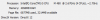
08:59:11.450: CPU Name: Intel(R) Core(TM) i5 CPU M 480 @ 2.67GHz
08:59:11.450: CPU Speed: 2660MHz
08:59:11.450: Physical Cores: 2, Logical Cores: 4
08:59:11.450: Physical Memory: 3948MB Total, 1457MB Free (NOTE: 32bit programs cannot use more than 3gb)
08:59:11.450: Windows Version: 10.0 Build 17134 (revision: 765; 64-bit)
08:59:11.450: Running as administrator: false
08:59:11.450: Aero is Enabled (Aero is always on for windows 8 and above)
08:59:11.817: Windows 10 Gaming Features:
08:59:11.817: Game Bar: Off
08:59:11.817: Game DVR: Off
08:59:11.818: Game DVR Background Recording: Off
08:59:12.354: Sec. Software Status:
08:59:12.424: Windows Defender Antivirus: enabled (AV)
08:59:12.425: Windows Firewall: enabled (FW)
08:59:12.425: Windows Defender Antivirus: enabled (ASW)
08:59:12.822: Current Date/Time: 2019-12-19, 08:59:12
08:59:12.822: Browser Hardware Acceleration: true
08:59:12.822: Portable mode: false
09:01:16.412: OBS 24.0.3 (32-bit, windows)
09:01:16.529: ---------------------------------
09:01:18.660: ---------------------------------
09:01:18.660: audio settings reset:
09:01:18.660: samples per sec: 44100
09:01:18.660: speakers: 2
09:01:19.290: ---------------------------------
09:01:19.291: Initializing D3D11...
09:01:19.291: Available Video Adapters:
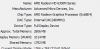
09:01:19.871: Adapter 0: AMD Radeon HD 6300M Series
09:01:19.871: Dedicated VRAM: 1064120320
09:01:19.871: Shared VRAM: 1879048192
09:01:19.871: output 0: pos={0, 0}, size={1366, 768}, attached=true
09:01:21.223: Loading up D3D11 on adapter AMD Radeon HD 6300M Series (0)
09:01:22.362: D3D11 loaded successfully, feature level used: b000
09:01:23.070: D3D11 GPU priority setup failed (not admin?)
09:01:39.110: ---------------------------------
09:01:39.110: video settings reset:
09:01:39.110: base resolution: 1366x768
09:01:39.110: output resolution: 1364x768
09:01:39.110: downscale filter: Bilinear
09:01:39.110: fps: 30/1
09:01:39.110: format: NV12
09:01:39.110: YUV mode: 601/Partial
09:01:39.139: NV12 texture support enabled
09:01:39.395: Audio monitoring device:
09:01:39.395: name: Default
09:01:39.395: id: default
09:01:39.488: ---------------------------------
09:01:40.325: [CoreAudio encoder]: CoreAudio AAC encoder not installed on the system or couldn't be loaded
09:01:40.549: Failed to load 'en-US' text for module: 'decklink-ouput-ui.dll'
09:01:44.031: [AMF] A critical error occured during AMF Testing.
09:01:44.031: Failed to initialize module 'enc-amf.dll'
09:02:02.348: [obs-browser]: Version 2.7.15
09:02:26.879: VLC found, VLC video source enabled
09:02:29.480: No blackmagic support
09:02:38.728: ---------------------------------
09:02:38.728: Loaded Modules:
09:02:38.728: win-wasapi.dll
09:02:38.728: win-mf.dll
09:02:38.728: win-dshow.dll
09:02:38.728: win-decklink.dll
09:02:38.728: win-capture.dll
09:02:38.728: vlc-video.dll
09:02:38.728: text-freetype2.dll
09:02:38.728: rtmp-services.dll
09:02:38.728: obs-x264.dll
09:02:38.728: obs-vst.dll
09:02:38.728: obs-transitions.dll
09:02:38.728: obs-text.dll
09:02:38.728: obs-qsv11.dll
09:02:38.728: obs-outputs.dll
09:02:38.728: obs-filters.dll
09:02:38.728: obs-ffmpeg.dll
09:02:38.728: obs-browser.dll
09:02:38.728: image-source.dll
09:02:38.728: frontend-tools.dll
09:02:38.728: enc-amf.dll
09:02:38.729: decklink-ouput-ui.dll
09:02:38.729: coreaudio-encoder.dll
09:02:38.729: ---------------------------------
09:02:38.975: ==== Startup complete ===============================================
09:02:41.302: All scene data cleared
09:02:41.302: ------------------------------------------------
09:02:42.875: WASAPI: Device 'Speakers (High Definition Audio Device)' initialized
09:02:43.140: [WASAPISource::TryInitialize]:[Microphone (High Definition Audio Device)] Failed to activate client context: 88890004
09:02:43.140: [WASAPISource::WASAPISource] Device '{0.0.1.00000000}.{6297a65a-49d4-4068-877c-4541a014264c}' not found. Waiting for device
09:02:43.451: WASAPI: Device 'Microphone (Elgato Sound Capture)' initialized
09:02:44.087: adding 510 milliseconds of audio buffering, total audio buffering is now 510 milliseconds (source: Mic/Aux 2)
09:02:44.087:
09:02:48.682: [WASAPISource::TryInitialize]:[Microphone (3- USB PnP Audio Device)] Failed to activate client context: 88890004
09:02:48.682: [WASAPISource::WASAPISource] Device '{0.0.1.00000000}.{f68c6ac1-19ad-405e-b383-386910d7d0b2}' not found. Waiting for device
09:02:48.993: Switched to scene 'Youtube'
09:02:49.548: ------------------------------------------------
09:02:49.548: Loaded scenes:
09:02:49.548: - scene 'Youtube':
09:02:49.548: - source: 'Mic Input' (wasapi_input_capture)
09:02:49.548: - source: 'Minecraft Recorder' (monitor_capture)
09:02:49.548: - source: 'Game Capture' (game_capture)
09:02:49.548: - scene 'Scene 2':
09:02:49.548: ------------------------------------------------
09:07:56.624: ==== Shutting down ==================================================
09:07:57.304: Switched to scene '(null)'
09:07:57.327: WASAPI: Device 'Speakers (High Definition Audio Device)' Terminated
09:07:57.470: WASAPI: Device 'Microphone (Elgato Sound Capture)' Terminated
09:07:57.475: All scene data cleared
09:07:57.475: ------------------------------------------------
09:07:58.518: Freeing OBS context data
09:07:59.717: [Scripting] Total detached callbacks: 0
09:08:02.010: == Profiler Results =============================
09:08:02.010: run_program_init: 242486 ms
09:08:02.010: ┣OBSApp::AppInit: 6250.44 ms
09:08:02.010: ┃ ┗OBSApp::InitLocale: 2402.13 ms
09:08:02.010: ┗OBSApp::OBSInit: 223373 ms
09:08:02.010: ┣obs_startup: 2045.39 ms
09:08:02.010: ┗OBSBasic::OBSInit: 96560.4 ms
09:08:02.010: ┣OBSBasic::InitBasicConfig: 1046.6 ms
09:08:02.010: ┣OBSBasic::ResetAudio: 151.902 ms
09:08:02.010: ┣OBSBasic::ResetVideo: 20606 ms
09:08:02.010: ┣OBSBasic::InitOBSCallbacks: 40.973 ms
09:08:02.010: ┣OBSBasic::InitHotkeys: 24.376 ms
09:08:02.010: ┣obs_load_all_modules: 59240.2 ms
09:08:02.010: ┃ ┣obs_init_module(coreaudio-encoder.dll): 2.356 ms
09:08:02.010: ┃ ┣obs_init_module(decklink-ouput-ui.dll): 1.834 ms
09:08:02.011: ┃ ┣obs_init_module(enc-amf.dll): 2494.56 ms
09:08:02.011: ┃ ┣obs_init_module(frontend-tools.dll): 2380.37 ms
09:08:02.011: ┃ ┣obs_init_module(image-source.dll): 0.011 ms
09:08:02.011: ┃ ┣obs_init_module(obs-browser.dll): 188.147 ms
09:08:02.011: ┃ ┣obs_init_module(obs-ffmpeg.dll): 755.116 ms
09:08:02.011: ┃ ┃ ┗nvenc_check: 721.261 ms
09:08:02.011: ┃ ┣obs_init_module(obs-filters.dll): 0.025 ms
09:08:02.011: ┃ ┣obs_init_module(obs-outputs.dll): 0.029 ms
09:08:02.011: ┃ ┣obs_init_module(obs-qsv11.dll): 4108.07 ms
09:08:02.011: ┃ ┣obs_init_module(obs-text.dll): 1.431 ms
09:08:02.011: ┃ ┣obs_init_module(obs-transitions.dll): 0.023 ms
09:08:02.019: ┃ ┣obs_init_module(obs-vst.dll): 0.007 ms
09:08:02.019: ┃ ┣obs_init_module(obs-x264.dll): 0.008 ms
09:08:02.019: ┃ ┣obs_init_module(rtmp-services.dll): 1580.76 ms
09:08:02.019: ┃ ┣obs_init_module(text-freetype2.dll): 308.417 ms
09:08:02.019: ┃ ┣obs_init_module(vlc-video.dll): 3710.53 ms
09:08:02.019: ┃ ┣obs_init_module(win-capture.dll): 0.286 ms
09:08:02.019: ┃ ┣obs_init_module(win-decklink.dll): 4.138 ms
09:08:02.019: ┃ ┣obs_init_module(win-dshow.dll): 5325.89 ms
09:08:02.019: ┃ ┣obs_init_module(win-mf.dll): 0.001 ms
09:08:02.019: ┃ ┣obs_init_module(win-wasapi.dll): 0.027 ms
09:08:02.019: ┃ ┗reset_win32_symbol_paths: 23.835 ms
09:08:02.019: ┣OBSBasic::ResetOutputs: 318.449 ms
09:08:02.019: ┣OBSBasic::CreateHotkeys: 225.52 ms
09:08:02.019: ┣OBSBasic::InitService: 611.152 ms
09:08:02.019: ┣OBSBasic::InitPrimitives: 34.624 ms
09:08:02.019: ┗OBSBasic::Load: 9722.89 ms
09:08:02.019: obs_hotkey_thread(25 ms): min=0.008 ms, median=0.035 ms, max=1647.93 ms, 99th percentile=0.655 ms, 99.9016% below 25 ms
09:08:02.019: audio_thread(Audio): min=0 ms, median=0.132 ms, max=233.245 ms, 99th percentile=1.497 ms
09:08:02.019: obs_graphics_thread(33.3333 ms): min=0.117 ms, median=2.188 ms, max=8121.92 ms, 99th percentile=23.025 ms, 99.3611% below 33.333 ms
09:08:02.019: ┣tick_sources: min=0 ms, median=0.189 ms, max=5236.21 ms, 99th percentile=3.29 ms
09:08:02.019: ┣output_frame: min=0.109 ms, median=0.529 ms, max=221.915 ms, 99th percentile=3.386 ms
09:08:02.019: ┃ ┗gs_context(video->graphics): min=0.108 ms, median=0.527 ms, max=221.913 ms, 99th percentile=3.383 ms
09:08:02.019: ┃ ┣render_video: min=0.006 ms, median=0.115 ms, max=20.104 ms, 99th percentile=0.688 ms
09:08:02.019: ┃ ┃ ┗render_main_texture: min=0.003 ms, median=0.109 ms, max=20.096 ms, 99th percentile=0.664 ms
09:08:02.019: ┃ ┗gs_flush: min=0.098 ms, median=0.401 ms, max=75.645 ms, 99th percentile=2.444 ms
09:08:02.019: ┗render_displays: min=0.001 ms, median=1.405 ms, max=8081.63 ms, 99th percentile=15.963 ms
09:08:02.019: =================================================
09:08:02.020: == Profiler Time Between Calls ==================
09:08:02.020: obs_hotkey_thread(25 ms): min=24.076 ms, median=25.968 ms, max=1672.82 ms, 28.6203% within ±2% of 25 ms (0.626683% lower, 70.7531% higher)
09:08:02.020: obs_graphics_thread(33.3333 ms): min=0.309 ms, median=33.333 ms, max=8121.94 ms, 83.5448% within ±2% of 33.333 ms (8.43597% lower, 8.01926% higher)
09:08:02.020: =================================================
09:08:02.205: Number of memory leaks: 0