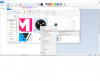
Hi guys, I was trying to capture my display, and I ran into a black screen.
I was reading in other comments that it has to do with the fact that I'm using a laptop and it has two video adapters
so indeed that is the problem that I can also see in the log file, but, my question is how can bypass it? and make everything run on one adapter?
Log file is attached
I was reading in other comments that it has to do with the fact that I'm using a laptop and it has two video adapters
so indeed that is the problem that I can also see in the log file, but, my question is how can bypass it? and make everything run on one adapter?
Log file is attached