Question / Help Constant recording issues

  • Thread starter Thread starter Deleted member 151974
  • Start date Start date
D

Deleted member 151974

Hi,

I can't seem to get a good quality recording no matter what I do.

I've been having all sorts of issues including...

-OBS making my game lag without even recording, the lag was reduced after I disabled the audio on OBS.
-My game with be flawless, but my recordings randomly start to lag at times in the recording.
-The audio 'sometimes' being out of sync.

Here is my log file.

I've tried a number of things like changing the video quality settings, the audio quality settings, tried all the types of bitrates with different vaules, disabling preview and I even went out and upgraded my 1070 to a 1080 ti OC just to try and get this to work and it's still not working... I've look at various YouTube videos and tried to google my issues but none of the solutions have worked for me...

The FPS in OBS always shows 60 and a very low CPU usage.
I opened task manager to monitor my CPU, memory and GPU usage and they are all fine...

When I'm not recording and don't have OBS open everything runs great and I play no problem.

I recently bought all of this equipment to make a YouTube and Twitch channel and it seems hopeless...

I would appreciate any help I can get.

Thank you for reading.
 
as i just suggested in another thread, get a proper audio aac codec, i use the one in apples itunes, u dont need itunes tho, just get extract the exec and rip out the x64 binary out of that one, and you'll have proper core audio codec.
b-frames 2 is a bit low, use at least 4. Also consider partial mode instead of full, it may help smooth out fps issues u otherwise might not crack.
Instead of setting level to auto, consider setting it to a FIXED value. You'll need 4.2 or higher or so. cant recall all the values. I use 5.0 because i noticed twitch can assume stuff about 4.2 which is a tldr thing. CQP as a mode is also hard to control, i would also here possibly consider a more fixed mode. a cqp of 23 at your screenmode, while default value, is pretty darn high given the resolution. Still, it should be fine.
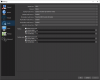
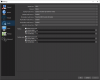
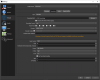
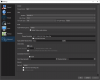
Post some screenies of settings to get more help.
 
Here is my new log file.

I have installed the CoreAudio codec and adjusted the settings aside from the CQP because you mentioned it should be fine.

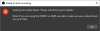
Now I'm getting an error saying...

'Starting the output failed. Please check the log for details.

Note: If you are using the NVENC or AMD encoders, make sure your video drivers are to date."

Which I confirmed the version is 398.36 which is current based off of Nvidia's website.

I appreciate your respond and am hoping you can help me figure this out please.

*EDIT1*

I tested recording with Bandicam and Action! and they seemed to work with no issue but I want to use OBS because it's obvious more advanced and versatile.
 

Attachments

  • Advanced.png
    Advanced.png
    61.6 KB · Views: 22
  • Audio.png
    Audio.png
    56.2 KB · Views: 22
  • Audio2.png
    Audio2.png
    56.2 KB · Views: 16
  • Failed to start.png
    Failed to start.png
    5.4 KB · Views: 22
  • Recording.png
    Recording.png
    59.8 KB · Views: 24
  • Untitled.png
    Untitled.png
    23.9 KB · Views: 19
  • Video.png
    Video.png
    41.4 KB · Views: 17
I have set the encoder level back to auto and can now record, but am still having the same issue.
 
You should provide a new log from a session where you are experiencing the issue so we can continue to see the whole picture.
 
Okay, no problem. Whatever you gentlemen need.

Here is my new log file.

I recorded briefly and in a 43 second video, there were 5 instances that it lagged on the recording when I watch it, but the game was buttery smooth.

Again, I just want to quickly point out that I've tried Bandicam and Action! and I don't have the issue.

Let me know if you guys need anything else.

Thank you for the help figuring this out.
 
I don't see anything in the log that jumps out at me, and there are no lagged or skipped frames to indicate any video issues. What are you using to view your video files?

As for the audio sync issue, you can try toggling your audio device's timestamps to see if that helps (if that is still occurring):
Some audio devices do not send proper timestamps, and can cause various issues, such as audio desync. Try disabling the device timestamps in OBS by clicking the Gear icon next to your audio source, select Properties, and then uncheck "Use device timestamps."
 
I am very confused.

After asking what I'm using to view my files I decided to play around with different video players and I'm getting totally different results which means that it's probably a video player issue and not a recording issue...

I'm guessing the video players can't handle 1440p video or something?

The audio issues stopped randomly.

I just tried playing my video in 5kPlayer and it was nearly flawless... I've been trying to figure this out for so long and it's the video player...

I don't understand why the Bandicam and Action! videos worked perfectly fine and the OBS ones don't on the same player...

Does any of this make sense?

***EDIT*** Okay, I've been messing around with my VLC player settings and now the Bandicam and Action! recordings are messed up so it's the video player...
 
Last edited by a moderator:
You should be able to use VLC to play almost any file just fine. The default Windows media players will not. I've never heard of 5KPlayer.

I don't know how Bandicam or Action! encode their files, so I can't say why they might have worked and why OBS recordings did not.
 
VLC is what I use by default. I'm looking online and it looks like people have issues playing HD content.

VLC was stuttering and the Windows Media Player was doing a freeze frame type thing sometimes showing blacked out frames.

And the lag is in different places.

I'm glad it's not my system or OBS, but I just need to figure out why VLC isn't working...
 
Other than making sure it's up to date and you're using the 64-bit version, and maybe try seeing if hardware decoding is enabled, I'm not familiar with any reasons why VLC wouldn't play 4K files correctly. Though I have no need to play 4K files, so I haven't tried this myself.
 
Okay, I don't understand this... So I can't play any of the videos I record in any player without it lagging.

The only way to get it to play without lagging is by uploading it on YouTube... Then it plays in full 1440p.

Any ideas? I desperately want this to work but I can't make sense of it...

I'll greatly appreciate any help please and thank you.
 
Back
Top