Hi all,
So I had a couple issues with my first attempt at recording a video in OBS.
So I recorded the video, and during the recording everything seemed fine; I was using Zoom through a virtual camera. I was able to hear the other person well, they show up in the video, but I basically can't hear their audio in the recorded files at all (I heard it fine through my ears during the interview.)
And I don't know why. I thought my testing before solved the issue, but I definitely can't run into this problem again. I feel like the settings were off where I had my desktop audio source? I;'m quite new to this and followed a guide.
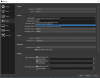
I've attached the relevant log file, and have posted a screenshot of my desktop audio options. If you need any other information please let me know...I'm super desperate for assistance as I have some other work lined up for next week.

So I had a couple issues with my first attempt at recording a video in OBS.
So I recorded the video, and during the recording everything seemed fine; I was using Zoom through a virtual camera. I was able to hear the other person well, they show up in the video, but I basically can't hear their audio in the recorded files at all (I heard it fine through my ears during the interview.)
And I don't know why. I thought my testing before solved the issue, but I definitely can't run into this problem again. I feel like the settings were off where I had my desktop audio source? I;'m quite new to this and followed a guide.
I've attached the relevant log file, and have posted a screenshot of my desktop audio options. If you need any other information please let me know...I'm super desperate for assistance as I have some other work lined up for next week.