Bug - recording always starts with "Pause" state

15:18:49.654: ================================
15:18:49.654: Warning: OBS is already running!
15:18:49.654: ================================

You have a second OBS running at the same time. You can restart the computer or force close the process from the task manager and then open again OBS.
 
15:18:49.654: ================================
15:18:49.654: Warning: OBS is already running!
15:18:49.654: ================================

You have a second OBS running at the same time. You can restart the computer or force close the process from the task manager and then open again OBS.
It just happened that i had second instance running. If i control that, so only one OBS.exe process is running, bug persists.

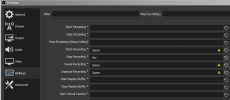
Edit: Sorry, it seems i can not edit the original post anymore( So i have to attach my screenshot from settings here:
 

Attachments

  • Hotkeys settings.PNG
    Hotkeys settings.PNG
    28.2 KB · Views: 16
Start and Stop can be the same hotkey, but not the Pause.
I guess you can use the same hotkey for pause and unpause too.

There's a reason for the yellow advertency icon
 
But how can be recording paused even if it doesn't exist yet? My post actually not about hotkeys, but rather about wrong initial state
 
Back
Top