fsnetworks
New Member
Hi everyone,
I'm having a persistent issue with washed out / dark colors in both the OBS preview and recorded files. I've spent a lot of time troubleshooting and nothing has worked so far. Hoping someone with a similar setup can help.
System specs:
- Laptop: ASUS (Gaming)
- CPU: Intel Core i9-13980HX
- GPU: NVIDIA GeForce RTX 4060 Laptop GPU (Driver 32.0.15.9174)
- RAM: 32 GB
- OS: Windows 11 25H2 (Build 26200)
- OBS Studio: 32.0.4
- Primary monitor: Xiaomi Mi Monitor, 3440x1440, 100Hz, Wide-Gamut (128% sRGB / 94% DCI-P3 coverage)
- Secondary monitor: Dell P2423D, 1440x2560, 59Hz
What the problem looks like:
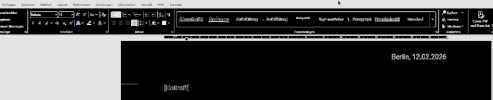
Both the OBS preview and the recorded video files appear dark and washed out. Interestingly, the source properties window inside OBS renders correctly (correct colors, white background), but as soon as the signal enters the OBS preview pipeline, colors are wrong. The issue affects all capture methods and all applications.
What I've already tried (nothing worked):
- Color format: NV12, BGRA, I444 – all tested
- Color space: sRGB, Rec. 709
- Color range: Full and Limited – both tested
- Capture method: DXGI Desktop Duplication and Windows 10 (1903+) / WGC – both tested
- "Force SDR" enabled on the monitor capture source
- Disabled Hardware-Accelerated GPU Scheduling (HAGS) in Windows settings + reboot
- Ran OBS as Administrator
- Changed ICC color profile to Adobe sRGB (previously an ASUS OEM profile was set)
- HDR is completely disabled in Windows – Auto-HDR also off
- NVIDIA Control Panel: checked video color settings
Key log entries:
The OBS log shows two suspicious lines on startup:
```
GPU conversion not available for format: 7
NV12 texture support not available
```
Also notable: the monitor color space is reported as `RGB_FULL_G22_NONE_P709` with a wide gamut (relative_gamut_area: 709=1.278, P3=0.942).
My theory:
The Wide-Gamut display combined with the Laptop GPU (hybrid graphics setup with both RTX 4060 and Intel UHD) seems to cause OBS to mishandle the color pipeline internally. The fact that the source properties window looks correct but the preview doesn't suggests the issue is inside OBS's rendering pipeline, not at the capture stage.
Has anyone encountered this with a similar setup (Wide-Gamut monitor + NVIDIA Laptop GPU + Windows 11 25H2)? Any help appreciated!
Please find log and a screenshot attached
I'm having a persistent issue with washed out / dark colors in both the OBS preview and recorded files. I've spent a lot of time troubleshooting and nothing has worked so far. Hoping someone with a similar setup can help.
System specs:
- Laptop: ASUS (Gaming)
- CPU: Intel Core i9-13980HX
- GPU: NVIDIA GeForce RTX 4060 Laptop GPU (Driver 32.0.15.9174)
- RAM: 32 GB
- OS: Windows 11 25H2 (Build 26200)
- OBS Studio: 32.0.4
- Primary monitor: Xiaomi Mi Monitor, 3440x1440, 100Hz, Wide-Gamut (128% sRGB / 94% DCI-P3 coverage)
- Secondary monitor: Dell P2423D, 1440x2560, 59Hz
What the problem looks like:
Both the OBS preview and the recorded video files appear dark and washed out. Interestingly, the source properties window inside OBS renders correctly (correct colors, white background), but as soon as the signal enters the OBS preview pipeline, colors are wrong. The issue affects all capture methods and all applications.
What I've already tried (nothing worked):
- Color format: NV12, BGRA, I444 – all tested
- Color space: sRGB, Rec. 709
- Color range: Full and Limited – both tested
- Capture method: DXGI Desktop Duplication and Windows 10 (1903+) / WGC – both tested
- "Force SDR" enabled on the monitor capture source
- Disabled Hardware-Accelerated GPU Scheduling (HAGS) in Windows settings + reboot
- Ran OBS as Administrator
- Changed ICC color profile to Adobe sRGB (previously an ASUS OEM profile was set)
- HDR is completely disabled in Windows – Auto-HDR also off
- NVIDIA Control Panel: checked video color settings
Key log entries:
The OBS log shows two suspicious lines on startup:
```
GPU conversion not available for format: 7
NV12 texture support not available
```
Also notable: the monitor color space is reported as `RGB_FULL_G22_NONE_P709` with a wide gamut (relative_gamut_area: 709=1.278, P3=0.942).
My theory:
The Wide-Gamut display combined with the Laptop GPU (hybrid graphics setup with both RTX 4060 and Intel UHD) seems to cause OBS to mishandle the color pipeline internally. The fact that the source properties window looks correct but the preview doesn't suggests the issue is inside OBS's rendering pipeline, not at the capture stage.
Has anyone encountered this with a similar setup (Wide-Gamut monitor + NVIDIA Laptop GPU + Windows 11 25H2)? Any help appreciated!
Please find log and a screenshot attached