
Background Removal

twinchester

New Member
I've downloaded, and installed the background removal for Windows 11.

I've followed the instructions to the best of my ability, with no progress.

The background filter isn't displayed in the Video Capture Device, as you should be able to see in the attachment.

I need help, please.
 

Attachments
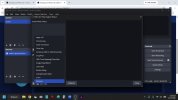
  • FILTERS.jpg
    FILTERS.jpg
    81.5 KB · Views: 53
Last edited:
Make sure the plugin is updated and compatible with the OBS version you're using.
If you have issues with a third party plugin you should contact its dev (and other users) via the Discussion section on the particular plugins' page or wherever the dev have set for this.
 
Make sure the plugin is updated and compatible with the OBS version you're using.
What am I supposed to do with a plugin? I thought I just hit the download, extract the files, and it should work. I don't see an .exe file anywhere in my download folder.

My OBS version is 32.2.2
 
It's not an OBS feature or option so you need to contact the support of the app or plugin you've installed.
 
Make sure the plugin is updated and compatible with the OBS version you're using.
If you have issues with a third party plugin you should contact its dev (and other users) via the Discussion section on the particular plugins' page or wherever the dev have set for this.
 
You didn't downloaded it from the OBS website. And you can see it on the link you posted.
Now, each third party plugin can have an special forum thread and said plugins aren't from OBS, are third party. So, in each third party plugin page there's a section called Discussion where you can write to the developer of that particular third party plugin.
The first thing you need to do when using a plugin is to verify if it works with the OBS version you have installed. To know this you need to go to the particular third party plugin page and look for this. If it's not specified then you can test it and see if it works. If it don't work then is clearly not compatible with the version of OBS you have installed. This is the case when you need to contact the developer of this particular third party plugin to know when it could be updated, and resolve any other issues you may have with that particular third party plugin.

In this particular forum you can get support for any issue related to OBS Studio for Windows version, not third party plugins.
 
I read few post from the mentioned discussion thread of the plugin before and now ( https://obsproject.com/forum/thread...irtual-green-screen-low-light-enhance.142442/ ). There is build in installation instruction for the plugin v1.5.0 for sure. This instruction is saved in form of the .html page that was designed for advanced users, and should be opened locally after the user extracts the contents of the plugin's archive to some temporary folder. Instruction mentions manipulations with the hidden (by default and on purpose) special Windows folder. This instruction also says that this method of installation is future for OBS on Windows platform. Users asked for the instruction (how to install the plugin) few times and then they got this... So, let's start from the scratch.

Can you attach your OBS log file?
 
Back
Top