Just A Guy
New Member
Hello,
i think, this is more a "could you please add a functionality"-thing than something else. I used OBS for quite some time as v-cam for meeting, but i started live-streaimg some few days ago.
In my new setup, OBS is used for streaming on twitch. Two-computer setup, one for gaming/content, one windows 11 pc for streaming -> OBS 29.1.3 64bit.
Microphone is a xlr-mic with a hardware-mixer that is usb-connected to the streaming pc (Yamaha AG03).
After initial setup, that runs usually like clockwork. But for whatever reason, only sometimes and very random, usually when i restart the pc, i have an issue:
The mixer (or a webcam, or usb-capture-card for example, but it has to be a USB-source) is kicked out of the global audio devices in OBS settings.
Sometimes completey random without changes in the usb-connections, but reproducable when switching a usb-device from one usb-port to another when pc is off.
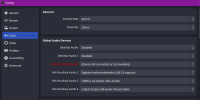
When this happens, it is highlighted in red inside the settings that there is a change or error. Thats nice, but i do not get a warning on obs-start, that something has changed. Sometimes i do a preliminary check if everything works fine, than all it takes are one to two obs-restarts (yes, sometimes two and without changing the settings) and everything is alright. But if I do not do these checks, and I realize that I have no mic during a live-stream and then try to reconnect the source, it will not be applied. I have to restart OBS for that, which is really annoying during stream.
Other software like voicemeter (i use that on the gaming-pc to easily manage more than one output sources) has something like "restart audio engine" and can do audio changes on the fly.
Is there a way t get that warning and fix audio issues during stream-runtime ?
At least the warning would be usefull....
This is in the log when it happend:
17:51:46.794: ---------------------------------
17:51:46.794: ==== Startup complete ===============================================
17:51:46.866: All scene data cleared
17:51:46.866: ------------------------------------------------
17:51:46.885: [win-wasapi: 'XLR-Mic'] update settings:
17:51:46.885: device id: {0.0.1.00000000}.{c40ad937-6a68-417d-a4aa-6561e194715e}
17:51:46.885: use device timing: 0
17:51:46.890: User selected new VST plugin: 'C:/Program Files/VSTPlugins/Lisp x64.dll'
17:51:46.891: [WASAPISource::TryInitialize]:[Line (3- AG06/AG03)] Failed to activate client context: 88890004
17:51:46.891: WASAPI: Device '{0.0.1.00000000}.{c40ad937-6a68-417d-a4aa-6561e194715e}' failed to start (source: XLR-Mic)
17:51:46.920: [Loaded global audio device]: 'XLR-Mic'
17:51:46.920: - filter: 'VST-2.x-Plugin_DeEsser' (vst_filter)
i think, this is more a "could you please add a functionality"-thing than something else. I used OBS for quite some time as v-cam for meeting, but i started live-streaimg some few days ago.
In my new setup, OBS is used for streaming on twitch. Two-computer setup, one for gaming/content, one windows 11 pc for streaming -> OBS 29.1.3 64bit.
Microphone is a xlr-mic with a hardware-mixer that is usb-connected to the streaming pc (Yamaha AG03).
After initial setup, that runs usually like clockwork. But for whatever reason, only sometimes and very random, usually when i restart the pc, i have an issue:
The mixer (or a webcam, or usb-capture-card for example, but it has to be a USB-source) is kicked out of the global audio devices in OBS settings.
Sometimes completey random without changes in the usb-connections, but reproducable when switching a usb-device from one usb-port to another when pc is off.
When this happens, it is highlighted in red inside the settings that there is a change or error. Thats nice, but i do not get a warning on obs-start, that something has changed. Sometimes i do a preliminary check if everything works fine, than all it takes are one to two obs-restarts (yes, sometimes two and without changing the settings) and everything is alright. But if I do not do these checks, and I realize that I have no mic during a live-stream and then try to reconnect the source, it will not be applied. I have to restart OBS for that, which is really annoying during stream.
Other software like voicemeter (i use that on the gaming-pc to easily manage more than one output sources) has something like "restart audio engine" and can do audio changes on the fly.
Is there a way t get that warning and fix audio issues during stream-runtime ?
At least the warning would be usefull....
This is in the log when it happend:
17:51:46.794: ---------------------------------
17:51:46.794: ==== Startup complete ===============================================
17:51:46.866: All scene data cleared
17:51:46.866: ------------------------------------------------
17:51:46.885: [win-wasapi: 'XLR-Mic'] update settings:
17:51:46.885: device id: {0.0.1.00000000}.{c40ad937-6a68-417d-a4aa-6561e194715e}
17:51:46.885: use device timing: 0
17:51:46.890: User selected new VST plugin: 'C:/Program Files/VSTPlugins/Lisp x64.dll'
17:51:46.891: [WASAPISource::TryInitialize]:[Line (3- AG06/AG03)] Failed to activate client context: 88890004
17:51:46.891: WASAPI: Device '{0.0.1.00000000}.{c40ad937-6a68-417d-a4aa-6561e194715e}' failed to start (source: XLR-Mic)
17:51:46.920: [Loaded global audio device]: 'XLR-Mic'
17:51:46.920: - filter: 'VST-2.x-Plugin_DeEsser' (vst_filter)