日本語ですみませんが、困ってるので助けてほしいです。

yuniluco

New Member
ログファイル → https://obsproject.com/logs/qYBtp8Ff8f084z4R

OBSを使ってTwitchでゲーム配信を試しているのですが、どうもカクカクしてフレームが飛び飛びになってしまいます。調べまくって試行錯誤と実験を繰り返しているのですが、とうとう行き詰りました。自分ではもう出来ることを見つけられないので、どこをどう直せばいいのかご助言頂きたいです。

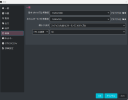
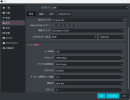
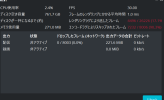
OBSの統計では、CPU使用率ネットワーク関連共に白字で問題無く、エンコードラグによりスキップされたフレームとレンダリングにより逃したフレームが赤字になります。 OBSの設定画面のスクリーンショットを添付しておりますので、他にエンコードに関する設定項目があれば是非ご教授下さい。

・設定の映像タブの解像度は、(1920×)1080から(640×)360まで試しましたが全てにおいて赤字の結果になりました。なお、360だとぼやけたりにじんだりするので、出来れば(1280×)720の解像度で配信したいです。
・ちなみに配信するゲームは全て2Dです。fpsは30に設定しています。
・タスクマネージャーでOBSの優先度はリアルタイムや高に毎回上げています。OBSの設定をいじる度に優先度が勝手に落ちてしまうようで、その都度上げ直しています。 また、OBSは管理者として実行しています。
・自宅の回線速度は出力入力共に300~700M[bps]あります。
・ディスク空き容量は700GB以上あります。
メモリ使用量は、200~400MBです。
・CPU7つのノートパソコンで、OSはWindows11です。
・デバイス、OBS、ともに、更新は常に最新の状態です。
・映像エンコーダの種類は、x264またはQuick sync H.264しか選択肢がありません。
・「OBS エンコードラグによりスキップされたフレーム」で検索し、めぼしいサイトは全てチェックしました。 他に出来ることがあれば教えて下さい。 パソコンはあまり詳しくないので、当たり前のことが出来ていない可能性もあるかもしれません。逆に設定をいじり過ぎて、ひょんな項目が既定値や他の方の設定と違っているかもしれません。

ちなみにピアノ配信では問題無くスムーズに配信出来ているので、他の配信関係のアプリが原因ではないと思っています。じゃあプレイするゲームが重すぎるのかというと、2Dなので、他の方々が配信しているようなゲームほどは重くないと思うんです。

一体何が原因なのでしょうか?
 

Attachments

  • スクリーンショット 2025-11-23 164604.png
    スクリーンショット 2025-11-23 164604.png
    37 KB · Views: 13
  • スクリーンショット 2025-11-23 164702.png
    スクリーンショット 2025-11-23 164702.png
    48.4 KB · Views: 13
  • スクリーンショット 2025-11-23 164720.png
    スクリーンショット 2025-11-23 164720.png
    76.1 KB · Views: 12

yuniluco

New Member
I translated it using Google.

I'm trying to stream a game on Twitch using OBS, but it's choppy and the frames are skipping.I've been researching extensively and experimenting with trial and error, but I've finally hit a dead end.I can't find anything I can do myself, so I'd like some advice on what to do and how to fix it.

In the OBS statistics, CPU usage and network related percentages are in white, meaning there are no problems, while frames skipped due to encoding lag and frames missed due to rendering are in red.I have attached a screenshot of the OBS settings screen, so if there are any other encoding settings, please let me know.

・I tried various resolutions in the video settings tab, from (1920x)1080 to (640x)360, but all of them came out in the red. Also, the image is blurry and smudged at 360, so I'd like to stream at a resolution of (1280x)720 if possible.
・By the way, all the games I stream are 2D and the fps is set to 30.
・I always set OBS's priority to real-time or high in the Task Manager. It seems like the priority drops automatically every time I change the OBS settings, so I have to raise it again. I also run OBS as administrator.
・The internet speed at my home is 300-700M[bps] for both input and output.
・There is over 700GB of free disk space.
・Memory usage is 200-400MB.
・The laptop has seven CPUs and runs Windows 11.
・Both your device and OBS are always up to date with updates.
・The only options for video encoder type are x264 or Quick sync H.264.
・I searched for "skipped frames due to OBS encoding lag" and checked all the relevant sites. Please let me know if there's anything else I can do. I'm not very knowledgeable about computers, so it's possible that I'm missing something obvious. On the other hand, I might have fiddled with the settings too much, and some random setting might be different from the default or other people's settings.

By the way, I can stream piano videos smoothly without any problems, so I don't think VTS or other streaming-related apps are the cause. So, is the game I'm playing too heavy? It's 2D, so I don't think it's as heavy as the games other people are streaming.

What could be the cause?
 

yuniluco

New Member
It seems that the reason is that my PC's GPU performance is low. Could you please tell me what kind of specs are required to stream games at 30 FPS and 1280x720 resolution?

To the OBS developers: I would like you to provide an easy-to-understand list of required GPU performance somewhere in OBS
 

Suslik V

Active Member
For some older versions of OBS the i7-4770K CPU + GTX980 GPU system was OK. This, or similar PC configuration, suitable for HD recordings (and sometimes streaming). FullHD and and 4K at 60fps are more demanding. As for integrated graphics - no go. Sometimes recording is possible but not streaming. And one more thing, capturing 2 programs simultaneously is very demanding task.
 
Top