# VDeck for Aitum Suite
This has no relation to the Aitum team; it's an unofficial code.
HTML Virtual deck Get All Custom Canvas and Outputs from Aitum Suite with Websocket.
You can find the GRID Version on: https://obsproject.com/forum/resources/vdeck-grid-for-aitum-suite.2367
Note: This was created for dual pc setup with a small touchscreen or external device Smartphone or tablet, for one pc Setup run your game in Windowed Borderless or Fullscreen Borderless.

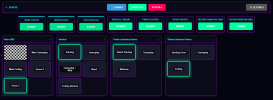
Hybrid Control: Manage Main OBS (Stream, Rec, Replay) and Aitum Suite scenes side-by-side in one unified interface.
Real-Time Sync: "State-aware" buttons pulse Green (Ready) or Red (Live) instantly, reflecting your actual OBS status via WebSocket events.
Touch-Optimized: Features large, hit-friendly toggle buttons and a responsive grid layout, perfect for controlling your stream from an iPad or Android tablet.
Drag & Drop Layout: Organize your workspace by simply dragging canvases to reorder them. Hide unused canvases with the "View" menu.
Visual Themes: Includes Dark (Default), Light (High Contrast), and Cyberpunk (Neon) modes.
Custom Image Scene Button : URL & LocalStorage.
Disable Text: Disable Scene Text Button.
This has no relation to the Aitum team; it's an unofficial code.
HTML Virtual deck Get All Custom Canvas and Outputs from Aitum Suite with Websocket.
You can find the GRID Version on: https://obsproject.com/forum/resources/vdeck-grid-for-aitum-suite.2367
Note: This was created for dual pc setup with a small touchscreen or external device Smartphone or tablet, for one pc Setup run your game in Windowed Borderless or Fullscreen Borderless.
Hybrid Control: Manage Main OBS (Stream, Rec, Replay) and Aitum Suite scenes side-by-side in one unified interface.
Real-Time Sync: "State-aware" buttons pulse Green (Ready) or Red (Live) instantly, reflecting your actual OBS status via WebSocket events.
Touch-Optimized: Features large, hit-friendly toggle buttons and a responsive grid layout, perfect for controlling your stream from an iPad or Android tablet.
Drag & Drop Layout: Organize your workspace by simply dragging canvases to reorder them. Hide unused canvases with the "View" menu.
Visual Themes: Includes Dark (Default), Light (High Contrast), and Cyberpunk (Neon) modes.
Custom Image Scene Button : URL & LocalStorage.
Disable Text: Disable Scene Text Button.