[DOWNLOAD WINDOWS VERSION HERE]
SyncSlide for OBS – Auto-Updating Browser Slideshow (with Shuffle)
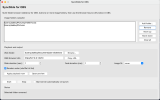
SyncSlide for OBS is a lightweight tool that creates a live-updating slideshow for OBS using a Browser Source.Unlike the built-in slideshow source, SyncSlide automatically detects new images added to a folder (e.g. Google Drive sync folder) and updates the slideshow in real time — no manual refresh needed.
Key features
- Auto-updating slideshow – new images appear instantly
- Multi-folder playlist – combine and reorder multiple folders
- Shuffle mode – plays images in randomized order (no immediate repeats)
- Adjustable timing – set slide duration and fade transition
- Browser Source output – works natively inside OBS
- Local HTTP server – no cloud or external services required
Typical use case
Perfect for:- Event photo walls
- Live streams with audience-submitted images
- Google Drive / cloud-synced image feeds
- Digital signage
How it works
- Select one or more image folders
- Start the app
- Add the provided URL to an OBS Browser Source
- Done — the slideshow updates automatically